

Disk Drill and EaseUS Data Recovery Wizard are among the most popular data recovery tools available today. Both can help you recover deleted files and deal with various data loss situations, but they aren’t identical when it comes to recovery performance, features, usability, or cost. In this Disk Drill vs. EaseUS comparison, we’ll examine what each tool has to offer, see how they perform in real-world recovery tests, and help you figure out which one better suits your needs.
Disk Drill is the better choice overall. In our tests, it recovered all 52 files in both deletion and lost partition scenarios, while EaseUS recovered 51 and 44 files, respectively. Disk Drill was also twice as fast on average and offers more advanced additional features. EaseUS is still a good option for beginners and has a larger free recovery allowance (up to 2 GB compared with Disk Drill’s 100 MB on Windows). However, Disk Drill offers better value, especially if you need recovery software for both Windows and Mac.
Disk Drill vs EaseUS Data Recovery Quick Comparison
So, how different are Disk Drill and EaseUS Data Recovery Wizard? Let’s take a quick look at their main features before we get into the details.
Feature |
Disk Drill |
EaseUS Data Recovery Wizard |
Free Version Limit |
100 MB on Windows, free scans and previews on Mac |
Up to 2 GB |
Pricing |
Starts from $89/year |
Starts from $69.95/month |
Supported OS |
Windows, macOS |
Windows, macOS |
iPhone / Android Recovery |
iPhone on Mac; Android on Mac (root required), iPhone recovery support in beta on Windows |
Separate MobiSaver software required |
Ease of Use |
Very easy; clean, intuitive interface |
Easy; guided recovery process |
Best For |
Everyday recovery, camera files, advanced recovery tools |
Beginners, general file recovery, built-in file repair |
Technical Support |
Email and online support |
Email, live chat, remote assistance |
Money-Back Guarantee |
No standard refund guarantee |
30 days, subject to refund policy |
Supported File Systems |
NTFS, FAT, exFAT, APFS, HFS+, EXT, BTRFS, ReFS |
NTFS, FAT, exFAT, EXT, HFS+, ReFS, APFS (Mac) |
Supported File Types / Signatures |
Around 400 file signatures |
1,000+ file formats (advertised) |
Scan Modes |
Universal Scan, Advanced Camera Recovery, Lost Partition Search |
Quick Scan, Deep Scan |
Scan Speed |
05 min 43 sec (test average) |
11 min 45 sec (test average) |
File Preview Before Recovery |
Yes |
Yes |
Recovery from Formatted / Lost Partitions |
Yes |
Yes |
Byte-to-Byte Backup / Disk Imaging |
Yes |
Yes |
RAID / NAS Support |
Yes, RAID reconstruction and NAS via SSH |
Yes, RAID and NAS recovery |
Video Repair / Corrupted File Repair |
Fragmented video reconstruction with Advanced Camera Recovery; browser-based Video Repair module included with the license at no extra cost. |
Video, photo, and document repair |
Extra Tools |
S.M.A.R.T. monitoring, data protection, disk cleanup, disk imaging, video repair |
File repair, bootable recovery media, disk imaging |
Website |
||
Download |
Disk Drill: What It Offers and How It Performs
Disk Drill is one of the best data recovery tools developed by CleverFiles, available for both Windows and macOS. It’s been around since 2010, and can handle various recovery situations, from simple accidental deletions to formatted SD cards and lost partitions.
What we liked the most about Disk Drill is that it doesn’t make data recovery feel overly technical. You select a drive, start a scan, preview the files it finds, and recover what you need. The interface is clean, and the results are easy to browse, even when a scan returns thousands of files.
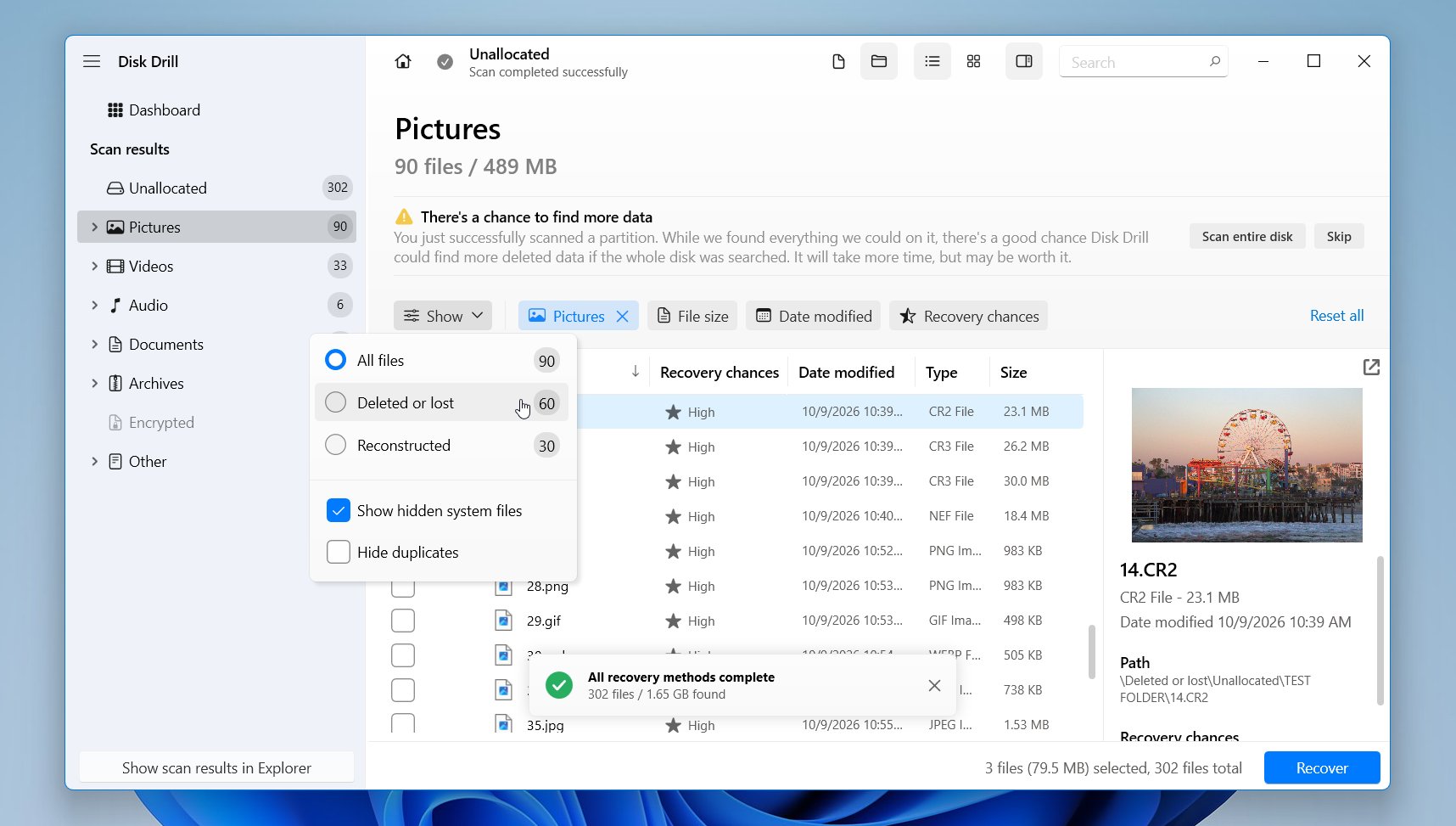
And there’s quite a bit more to it than a nice interface. Disk Drill 6 introduced Advanced Camera Recovery, which can reconstruct fragmented videos from cameras and drones. It also has a built-in disk imaging feature, which we regularly recommend for drives that may have problems. You can create a disk image first and scan that copy without repeatedly accessing the original drive. RAID and NAS recovery, S.M.A.R.T. monitoring, and support for most modern file signatures are also part of the package.
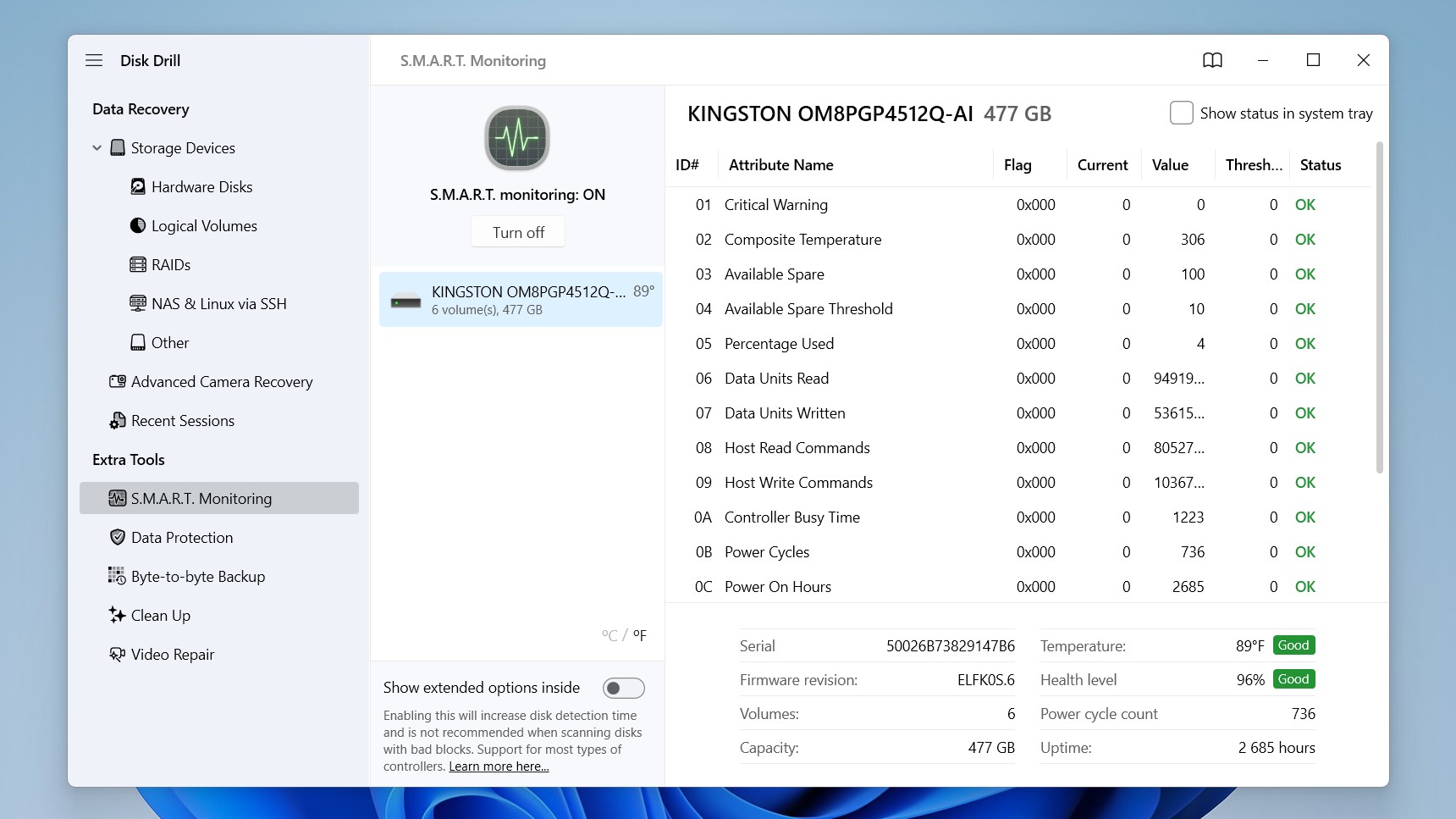
Here is what we would like to highlight:
Pros:
- Excellent recovery results on both Windows and macOS
- Clean, beginner-friendly interface
- Strong support for RAW photos and fragmented videos
- Supports a wide range of file systems and storage devices
- Free file previews
- Disk imaging
- Advanced Camera Recovery for cameras and drones
- RAID and NAS recovery support
- Useful extras like S.M.A.R.T. monitoring and Recovery Vault
- One PRO license covers both Windows and Mac
Cons:
- Free recovery is limited to 100 MB on Windows
- Mac version requires PRO to recover files
Our Disk Drill Recovery Test Results
For our recovery tests, we used a Windows 11 PC and a set of 52 files, including photos, videos, documents, and other formats. We tested two data loss scenarios: normal file deletion and deletion of the entire partition.
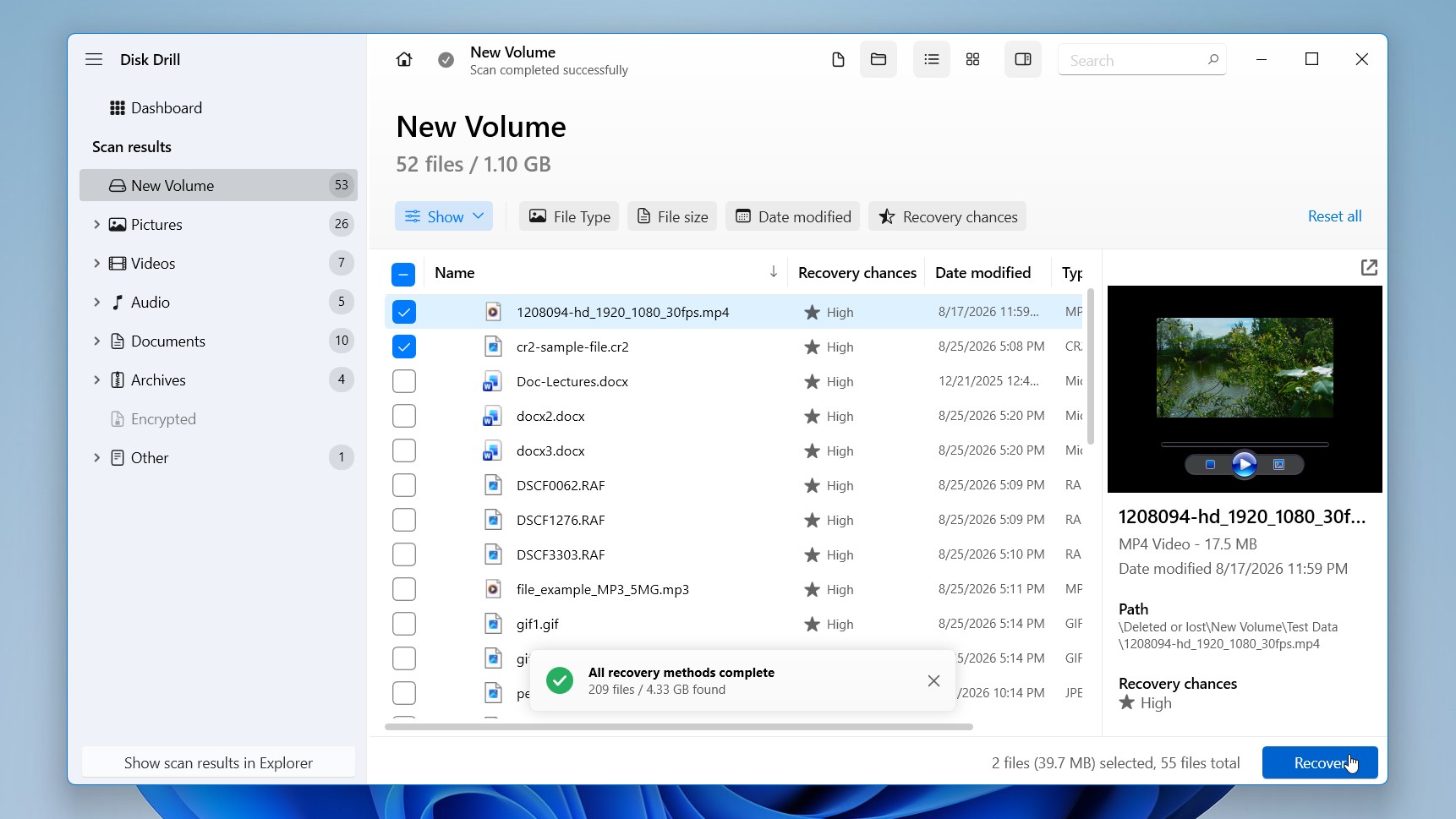
Disk Drill achieved a perfect result in both tests, recovering all 52 out of 52 files each time. The scans were also quite fast, taking an average of just 5 minutes and 43 seconds.
One thing we particularly liked was how easy it was to check the results. Disk Drill organized the recovered files into categories, and the preview feature let us open photos, videos, and documents before recovery to confirm they were intact. This saved us from having to recover everything just to see which files actually worked.
Want to see what else is available? You can also check a guide to the best Disk Drill alternatives and compare other recovery tools.
EaseUS Data Recovery Wizard: Overview and Test Results
EaseUS Data Recovery Wizard is a data recovery program developed by EaseUS, a software company that’s been around since 2004. Available for both Windows and macOS, it can recover deleted files, formatted partitions, and data from RAW or inaccessible drives. It supports common storage devices, including internal and external hard drives, SSDs, USB flash drives, and memory cards.
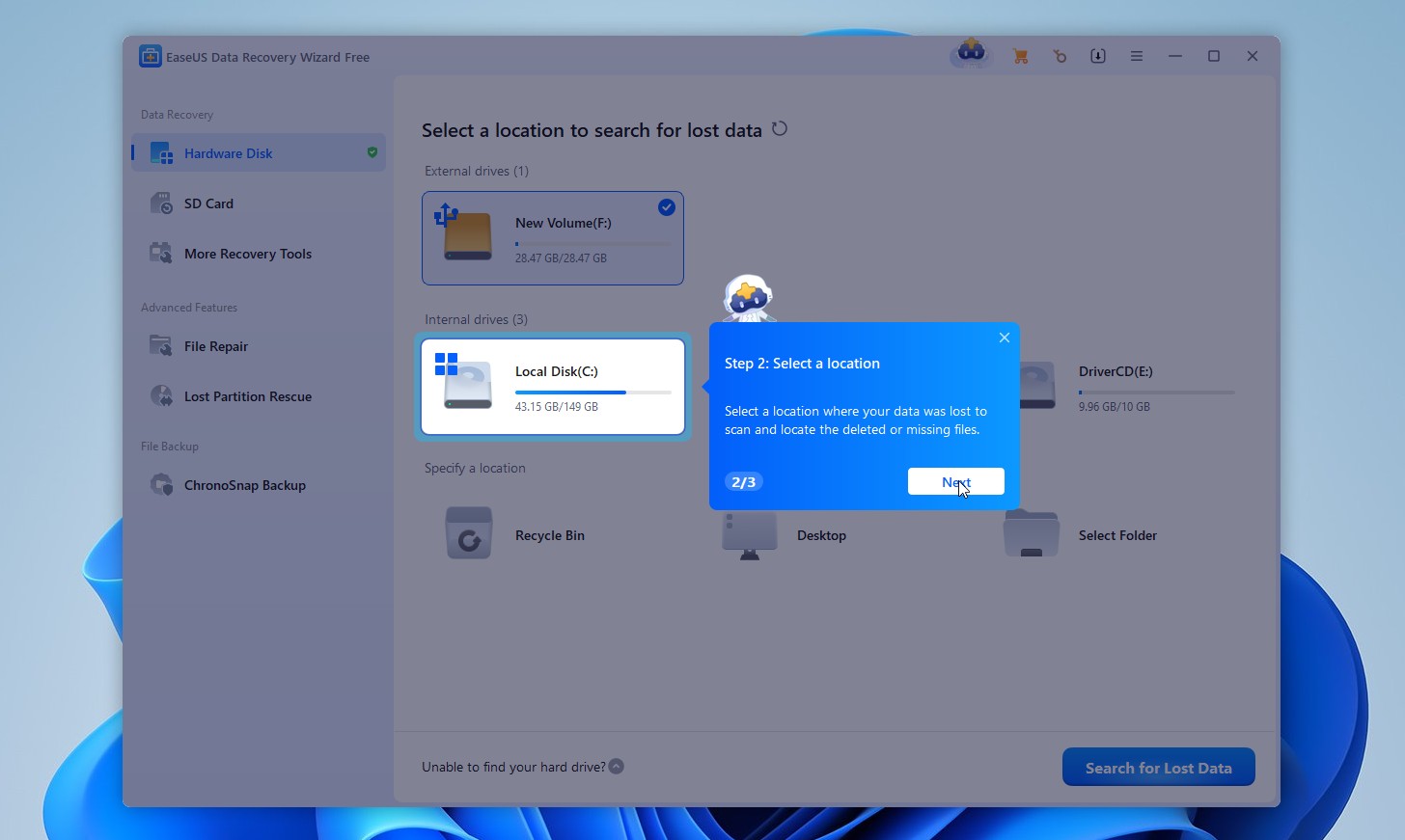
One of EaseUS’s biggest strengths is its beginner-friendly interface. You select a drive, click Search for Lost Data, and the software automatically runs quick and deep scans. As files appear, you can browse them by type or original folder, use filters to narrow down the results, and select what you want to recover. There are also helpful tips throughout the process, although some of the pop-ups can get a little distracting.
EaseUS has a few useful extras beyond basic recovery. It includes tools that can attempt to repair damaged photos, videos, and documents, along with support for basic RAID and NAS recovery. However, its file preview feature is fairly limited, especially for less common formats and files larger than 100 MB. It also lacks some of the more advanced recovery and disk protection tools found in Disk Drill.
Here is what we would like to highlight:
Pros:
- Beginner-friendly interface with helpful guidance
- Good recovery capabilities for common file types
- Supports a wide range of file systems and storage devices
- Free recovery of up to 2 GB on Windows
- Automatic quick and deep scanning
- Built-in file repair tools for photos, videos, and documents
- File filters and search options to find specific files
- Live chat, email support, and remote assistance
Cons:
- Limited file previews, including a 100 MB file size cap
- Less reliable recovery of uncommon formats and fragmented videos
- Limited RAID and NAS recovery capabilities
- Lacks several advanced recovery and disk protection tools
- Promotional pop-ups can be distracting
- Windows and macOS require separate licenses
- Paid plans are relatively expensive
Our EaseUS Data Recovery Test Results
We put EaseUS Data Recovery Wizard through the exact same tests as Disk Drill, using the same Windows 11 PC, storage device, and dataset of 52 files. The two scenarios were also identical: normal file deletion and deletion of the entire partition.
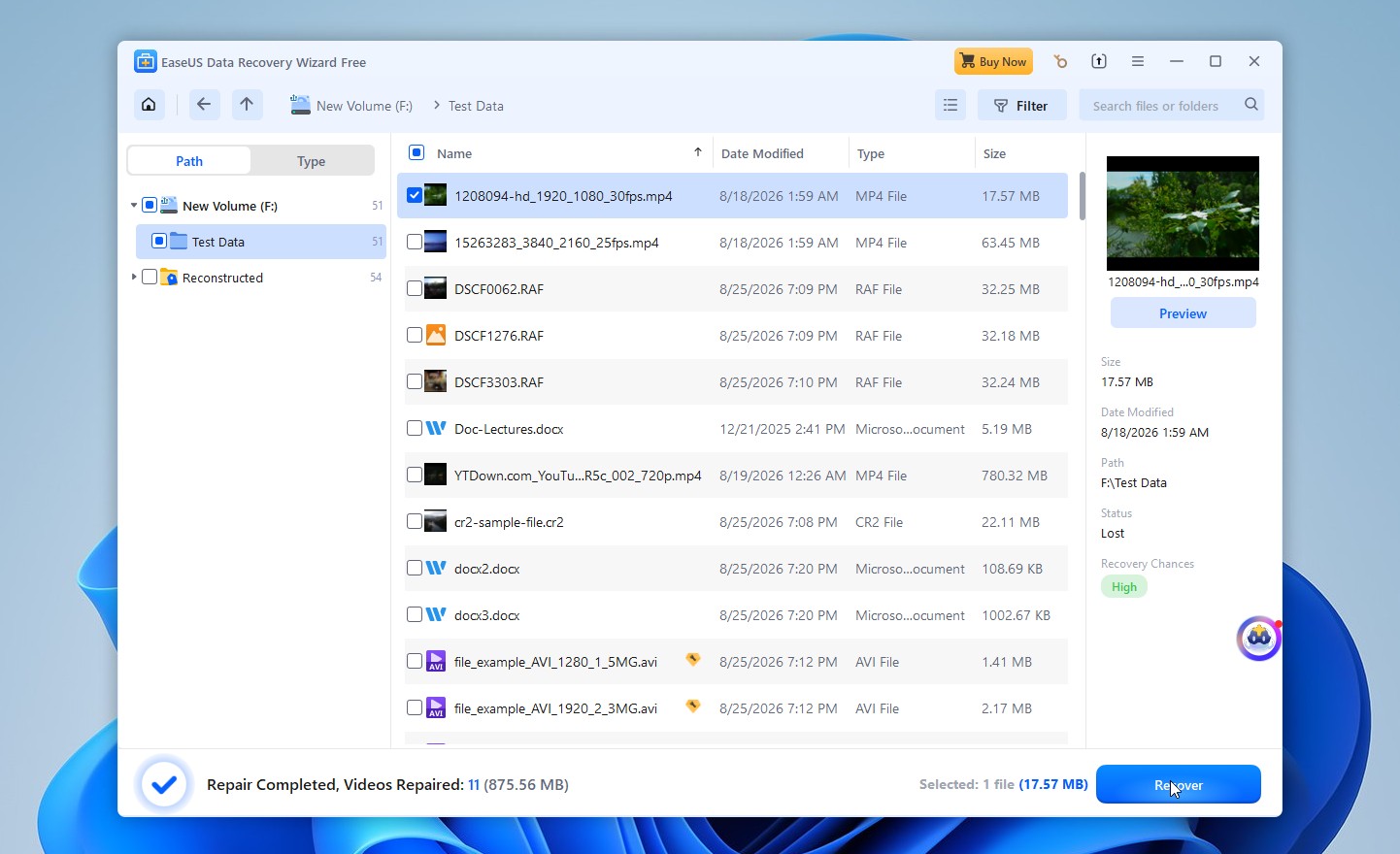
EaseUS recovered 51 out of 52 files in the deletion test, which is a very good result. However, it struggled more with the deleted partition, recovering only 44 out of 52 files.
EaseUS was also noticeably slower, with scans taking an average of 11 minutes and 45 seconds, more than twice as long as Disk Drill. Overall, it handled simple file deletion well, but its results were less impressive when we moved to partition recovery.
If EaseUS doesn’t have everything you’re looking for, take a look at the ranking of the best EaseUS alternatives for other options worth considering.
Disk Drill vs EaseUS Data Recovery Wizard: Pricing, Features, Usability and Device Support
Now that we’ve gone over what Disk Drill and EaseUS offer and how they performed in our tests, let’s take a closer look at how they compare. We’ll break down their pricing, features, ease of use, and device support to see where each tool has the upper hand.
Disk Drill vs EaseUS: Pricing Comparison
Both Disk Drill and EaseUS Data Recovery Wizard offer free versions with limited recovery allowances, as well as paid licenses that unlock unlimited data recovery. However, their pricing structures differ quite a bit, especially when it comes to license duration, device limits, and cross-platform support.
Disk Drill Pricing
Disk Drill’s pricing is fairly standard for data recovery software, with annual and lifetime licenses available. However, one thing that sets it apart from many competitors is that a single license covers both Windows and macOS, which is relatively rare in this category. Let’s take a closer look at its pricing options and what each plan includes.
Plan |
Price |
What you get |
Disk Drill Basic |
Free |
Unlimited scanning and previews, up to 100 MB of free recovery on Windows |
Disk Drill PRO (Annual) |
$89/year |
Unlimited recovery, all features and upgrades while subscribed |
Disk Drill PRO (Lifetime) |
$149 one-time |
Unlimited recovery and all future upgrades for the lifetime of the product |
Disk Drill Enterprise |
Custom pricing |
Business licensing for your specific requirements |
Additional details:
- A license supports one user on up to three devices.
- Both paid plans allow personal and business use.
- The annual subscription renews automatically unless canceled.
EaseUS Data Recovery Wizard Pricing
EaseUS Data Recovery Wizard offers separate licenses for Windows and macOS, with monthly, yearly, and lifetime options. The Mac version is more expensive across all paid plans, although the features and licensing terms are largely similar.
Here are Windows plans:
Plan (Windows) |
Price |
What you get |
EaseUS Free |
Free |
Up to 500 MB of recovery, expandable to 2 GB through social sharing |
One-Month |
$69.95 |
Unlimited recovery for one month |
One-Year |
$99.95 |
Unlimited recovery for one year |
Lifetime Upgrade |
$149.95 one-time |
Unlimited recovery and lifetime upgrades |
For Mac:
Plan (Mac OS) |
Price |
What you get |
EaseUS Free |
Free |
Up to 2 GB of recovery (500 MB initially, expandable through social sharing) |
One-Month |
$89.95 |
Unlimited recovery for one month |
One-Year |
$119.95 |
Unlimited recovery for one year |
Lifetime Upgrades |
$169.95 one-time |
Unlimited recovery and lifetime upgrades |
Additional details:
- Windows monthly and yearly licenses cover one computer, while the lifetime license covers two. All Mac licenses cover one Mac.
- Windows and macOS licenses are sold separately.
- Monthly and yearly licenses expire at the end of their terms without automatic renewal.
- All paid plans include free remote assistance.
- EaseUS offers a 30-day money-back guarantee, subject to its refund policy.
- Educational discounts and software bundles are also available. For example, eligible students can get 40% off the Mac version.
Disk Drill offers better value for money, particularly if you plan to use data recovery software more than once. Its annual license costs $89, compared with EaseUS’s $99.95 on Windows and $119.95 on Mac. The difference is also noticeable with lifetime licenses: Disk Drill costs $149, while EaseUS charges $149.95 for Windows and $169.95 for Mac.
More importantly, Disk Drill includes both Windows and macOS versions in a single purchase and allows installation on up to three devices. EaseUS requires separate purchases for each operating system and has stricter device limits.
EaseUS does have an advantage if you only need to recover a small amount of data for free, since its free recovery allowance is considerably larger. Its monthly licenses may also appeal to users who need the software for a single recovery job. However, for long-term use, Disk Drill is the more attractive option, especially when you consider its broader feature set and stronger recovery performance in our tests.
Disk Drill vs EaseUS: Features Comparison
When it comes to features, both Disk Drill and EaseUS cover the basics, from scanning lost files to previewing results before recovery. The differences become more noticeable when you look at their additional tools. Disk Drill offers more options for complex recovery cases and data protection, while EaseUS includes file repair features.
Here’s how their capabilities compare:
Feature |
Disk Drill |
EaseUS |
Quick and deep scanning |
✅ |
✅ |
File signature recovery |
✅ |
✅ |
Lost partition detection and recovery |
✅ |
✅ |
File previews |
✅ Extensive format support |
✅ More limited format support |
File filtering and sorting |
✅ |
✅ |
Recovery chance prediction |
✅ |
❌ |
Recovery during scanning |
✅ |
✅ |
Save and resume scan sessions |
✅ |
✅ |
Byte-to-byte disk imaging |
✅ Advanced, with bad sector handling and resume support |
✅ Basic disk imaging |
S.M.A.R.T. disk health monitoring |
✅ |
❌ |
Advanced Camera Recovery |
✅ |
❌ |
Recovery Vault |
✅ |
❌ |
RAID and NAS recovery |
✅ Broad support |
✅ Limited support |
Remote recovery over SSH |
✅ |
✅ |
Hex viewer |
✅ |
❌ |
Mount scan results as a virtual disk |
✅ |
❌ |
File repair tools |
✅ |
✅ |
Real-time backup |
❌ |
✅ |
Dark mode |
✅ |
❌ |
Disk Drill wins in terms of features, particularly when it comes to tools that can improve the recovery process or help prevent further data loss. Its Advanced Camera Recovery module can reconstruct fragmented video files from cameras and drones, while its byte-to-byte backup feature offers more control when working with unstable drives. S.M.A.R.T. monitoring, recovery chance predictions, and Recovery Vault are also useful additions that EaseUS lacks.
EaseUS isn’t without its advantages. It includes file repair tools for damaged photos, videos, and documents included in the app, along with ChronoSnap Backup. These features may appeal to users who want basic recovery and file repair options in one application. However, its disk imaging capabilities are less advanced, and it lacks several tools that Disk Drill provides.
Disk Drill vs EaseUS: Usability Comparison
You don’t need much technical knowledge to recover files with Disk Drill or EaseUS Data Recovery Wizard. Each program has an easy-to-use interface and guides you through the main recovery steps. However, the experience can differ when you move beyond basic scanning and start working with previews, filters, or additional tools. Here’s how they compare across common recovery tasks.
Task |
Disk Drill |
EaseUS |
Winner |
Installation and first launch |
Quick installation, clean interface, and clearly organized tools. |
Easy installation and helpful onboarding tips, although promotional pop-ups can be distracting. |
Disk Drill |
Starting a recovery scan |
Select a device, choose a scan mode when prompted, and start scanning. |
Select a drive and click Search for Lost Data. Scanning starts automatically. |
Tie |
Monitoring scan progress |
Detailed progress information, live file counts, and categories of found files. |
Displays scan progress and found files in real time, but file counts can fluctuate. |
Disk Drill |
Finding specific files |
Search, folder views, and filters for file type, size, date, and recovery chances. |
Search, folder views, and filters for file type, size, and modification date. |
Disk Drill |
Previewing recoverable files |
Supports previews for many formats, including RAW photos and large videos. |
Limited format support, slower previews, and a 100 MB preview size limit. |
Disk Drill |
Checking recovery chances |
Displays estimated recovery chances for individual files. |
No equivalent recovery chance indicators. |
Disk Drill |
Recovering selected files |
Select the files, click Recover, and choose a destination. |
Uses essentially the same process. |
Tie |
Resuming an interrupted scan |
Saves scan sessions and lets you continue later, including across Windows and macOS. |
Supports saving and resuming scans. |
Disk Drill |
Repairing recovered files |
Web-based video repair (free with license). |
Includes tools for repairing certain damaged photos, videos, and documents. |
EaseUS |
Creating a disk image |
Dedicated Byte-to-byte Backup tool with bad-sector handling, progress visualization, and resume support. |
Offers disk imaging, but the tools are less prominent and provide fewer options. |
Disk Drill |
Disk Drill vs EaseUS: Device Support Comparison
Both Disk Drill and EaseUS Data Recovery Wizard support a wide range of storage devices, including internal and external hard drives, SSDs, USB flash drives, and memory cards. However, Disk Drill offers broader support for more complex storage setups, such as RAID arrays and NAS devices. There are also differences in mobile device recovery, as EaseUS requires separate software for phones, while Disk Drill includes this functionality in its Mac version.
Device or Storage Type |
Disk Drill |
EaseUS |
Internal HDDs and SSDs |
✅ |
✅ |
External HDDs and SSDs |
✅ |
✅ |
USB flash drives |
✅ |
✅ |
SD, microSD, and other memory cards |
✅ |
✅ |
Unmountable partitions |
✅ |
✅ |
RAID arrays |
✅ |
Limited support |
NAS devices |
✅ |
Limited support |
Remote recovery over SSH |
✅ |
✅ |
iPhones and iPads |
✅ Mac version |
Separate EaseUS MobiSaver software |
Android phones and tablets |
✅ Mac version, compatible devices |
Separate EaseUS MobiSaver for Android software |
Advanced camera video recovery |
✅ |
❌ |
EaseUS Data Recovery Wizard vs Disk Drill for Mac
Disk Drill and EaseUS Data Recovery Wizard are solid software choices for Mac users. Disk Drill supports macOS 10.15 Catalina and newer, while EaseUS goes further back to macOS 10.9 Mavericks. Both work with Apple Silicon Macs and support the latest macOS releases, including macOS Golden Gate. They also handle common Mac file systems like APFS and HFS+.
Disk Drill has the upper hand when it comes to recovery capabilities. It offers Advanced Camera Recovery for reconstructing fragmented videos, a disk imaging tool for unstable drives, and built-in recovery support for iPhones and compatible Android devices. Disk Drill 6 also includes video repair tools and a wide range of file preview options.
EaseUS is still a good alternative, especially for beginners. It has a clean interface, supports older Macs, and includes useful features such as Recover to Cloud, video repair, and bootable recovery media. However, its file preview limitations can make it harder to check recoverable files before restoring them.
Disk Drill vs EaseUS: Reddit Users’ Choice
Reddit users tend to have pretty strong opinions about data recovery software, and even good tools can get judged pretty harshly, especially in communities like r/datarecovery, where experienced users and recovery professionals often share their advice.
With that in mind, Disk Drill generally has a better reputation than EaseUS in these discussions and has become quite a popular recommendation. This is especially true for recent versions, which have improved quite a bit and introduced several useful features.
For example, one user shared their experience in a post titled “Disk Drill did the deed!”. After several unsuccessful attempts with other methods, they managed to recover their files from a SanDisk external HDD with Disk Drill 6. They were particularly happy with the interface and technical support:
The user interface is sweet and clean, and their tech support (by mail) swift and sure. I’m happy.
What’s more interesting is that even some users who previously weren’t fans of Disk Drill have changed their opinions. In another discussion, Reddit user u/pcimage212 admitted:
I wasn’t a fan of DD for many years as its seemed cumbersome and didn’t always produce decent results.
However, they went on to explain that recent versions have become much better, particularly Disk Drill 6, which introduced advanced photo and video recovery features based on GoProRecovery technology.
EaseUS, on the other hand, receives considerably more criticism, and not all of it concerns recovery performance. Pricing, licensing practices, and refund procedures are recurring complaints.
One user described their experience in a Reddit post about EaseUS recovery and refunds. They purchased the software to recover deleted JPG files from an SSD, but it couldn’t restore the photos they needed. Although the support team eventually approved a full refund, the process required several troubleshooting steps and additional technical information.
Another commenter, u/disturbed_android, pointed out that SSD TRIM likely made the deleted files unrecoverable regardless of the software used. They also offered some practical advice:
With any decent file recovery tool you can use the demo to see if files are detected and if you can preview a JPEG. If not, there’s no use in buying.
That doesn’t mean everyone has had a bad experience with EaseUS. In a discussion about whether EaseUS deserves its negative reputation, one user argued that it performed better than several alternatives they had tried. They praised its scan speed, beginner-friendly interface, file previews, and ability to detect older files:
Easeus was the fastest and least demanding on my hard drive
Other community members strongly disagreed, however, and raised concerns about recovery reliability, licensing, and the company’s business practices.
Final Verdict
After comparing Disk Drill and EaseUS Data Recovery Wizard across recovery performance, features, usability, and pricing, Disk Drill is our overall winner. It recovered more files in our tests, completed scans considerably faster, and offers more tools for complicated recovery situations. EaseUS remains a solid alternative, especially if you want a larger free recovery allowance or access to file repair tools.
🏆 Choose Disk Drill if:
- You want the best possible recovery results, especially for lost partitions and less common file formats.
- You need to recover RAW photos or fragmented videos from cameras and drones.
- You want faster scans, better file previews, and more control over the recovery process.
- You need advanced tools such as disk imaging, S.M.A.R.T. monitoring, or RAID and NAS recovery.
- You own both Windows and Mac devices and want one license that covers both.
- You plan to use recovery software more than once and want better long-term value.
👍 Choose EaseUS if:
- You want to recover up to 2 GB of data for free.
- You need built-in tools to attempt repairs on damaged photos, videos, or documents.
- You only need recovery software for a month and don’t want to pay for an annual or lifetime license.
Whichever program you choose, scan your drive and preview the recoverable files before purchasing a license. This will give you a better idea of whether the software can recover the data you actually need.
FAQ
Which is better, EaseUS or Disk Drill?
Both EaseUS and Disk Drill are good data recovery tools, but Disk Drill is the better choice overall. It delivered stronger recovery results in our tests, with faster scans and more advanced features. Disk Drill also has a better reputation among users, particularly in data recovery communities, where EaseUS receives more criticism for its pricing and licensing practices. Still, EaseUS is worth considering if you want a larger free recovery allowance or built-in file repair tools.
Is EaseUS actually free?
EaseUS Data Recovery Wizard offers a free version, but it comes with a recovery limit. You can recover up to 500 MB of data for free, with the option to increase that limit to 2 GB by sharing the software on social media. You can also scan your drive and preview recoverable files before paying. If you need to recover more than 2 GB, you’ll have to purchase a license. One important distinction is that the Free and Trial versions are not the same. The Trial version only lets you scan and preview files, without recovering them for free.
Which is better for beginners and non-tech users: EaseUS or Disk Drill?
Both Disk Drill and EaseUS are easy to use, even if you have no previous experience with data recovery software. However, Disk Drill offers a more polished experience, with clearly organized scan results and convenient file previews.
What are the main differences between EaseUS and Disk Drill?
The biggest differences between Disk Drill and EaseUS are their recovery performance, features, and pricing. Disk Drill performed better in our recovery tests, offers broader support for file systems and storage devices, and includes advanced features such as RAID recovery, S.M.A.R.T. monitoring, and Advanced Camera Recovery. EaseUS offers a larger free recovery allowance on Windows, but Disk Drill provides more recovery tools and generally better value for users who need a paid license.
This article was written by Andrii Yasko, a Content Strategist at Handy Recovery Advisor. It was also verified for technical accuracy by Roman Demian, our editorial advisor.
Curious about our content creation process? Take a look at our Editor Guidelines.