
Finding a good iPhone storage cleaner can take some trial and error, especially with so many similar-looking options on the App Store. To make the choice easier, we tested and compared popular cleaners based on how well they free up storage, their features, ease of use, and overall value. Below, we’ve narrowed them down to the 10 best iPhone storage cleaner apps you can download in 2026, with both free and paid options included.
TL;DR: We tested dozens of iPhone cleaner apps and narrowed the list down to the 10 best options. Clever Cleaner is our top pick thanks to its strong cleanup tools, accurate results, generous free access, and simple interface.
Because of iOS restrictions, no cleaner app can remove every type of data from an iPhone, so most focus mainly on photos and videos. Some apps are better suited to more specific tasks, such as cleaning up contacts or organizing a photo library manually.
Quick Summary
First, here’s a quick recap of the 10 iPhone storage cleaner apps that made our list.
We’ve included each app’s App Store rating alongside our own score, based on the evaluation points we’ll break down in detail right after the ranking. Think of this as a fast overview.
We ended up with a pretty wide mix here. If you’re looking for a free iPhone cleaner without subscription, there are a couple of solid choices. If you don’t mind paying for a subscription to get more features, there are options for that too.
# |
Name |
App Store Rating |
Ratings |
Our Rating |
Features |
Price |
Best For |
1 |
4.8 |
81K |
5.0 🏅 |
Similar image detection, large video cleanup, screenshot cleanup, Live Photo conversion, swipe-based photo cleanup, smart cleanup, photo & video compression |
Free |
Complete photo and video library cleanup |
|
2 |
4.7 |
707K |
4.8 |
Duplicate & similar photo detection, similar video detection, screenshot cleanup, video compression, contact cleanup, email cleanup, swipe-based photo cleanup |
Weekly subscription ($11.99) Lifetime ($49.99) |
All-in-one iPhone cleanup |
|
3 |
4.5 |
67K |
4.8 |
Similar photo, video & screenshot detection, video compression, duplicate contact cleanup, calendar cleanup, storage analysis |
From $6.99/week to $49.99/year |
Cleaning photos, videos, contacts, and calendar data |
|
4 |
4.6 |
23K |
4.7 |
Duplicate & similar photo detection, blurry & low-quality photo detection, screenshot & photo clutter cleanup, large video detection, photo library organization, photo library monitoring |
From $9.99/month Lifetime (44.99) |
Photo library organization |
|
5 |
4.8 |
29K |
4.7 |
Duplicate contact detection, contact merging & bulk deletion, incomplete contact detection |
Free |
Contact cleanup and organization |
|
6 |
4.8 |
16K |
4.6 |
Manual photo sorting, album organization, photo deletion, undo for recent actions |
From $1.99/week to $34.99/ lifetime |
Organizing your photo library with maximum control |
|
7 |
4.6 |
208K |
4.6 |
Duplicate photo & video detection, photo & video compression, contact cleanup, email cleanup, calendar event cleanup, private file storage |
Monthly subscription ($11.99) Annual subscription ($49.99) |
AI-powered photo and video cleanup |
|
8 |
4.6 |
114K |
4.5 |
Duplicate & similar photo detection, similar video detection, screenshot cleanup, video compression, contact cleanup & backup, email cleanup, private photo storage |
Weekly subscription ($7.99) Annual subscription ($49.99) Lifetime purchase ($119.99) |
Photo and video cleanup with photo enhancement |
|
9 |
4.4 |
349K |
4.5 |
Duplicate & similar photo and video detection, automatic cleanup, swipe-based photo cleanup, video compression, contact cleanup, email cleanup, calendar cleanup, private file storage |
Weekly subscription ($6.99) Annual subscription ($29.99) |
Feature-packed all-in-one cleanup |
|
10 |
4.4 |
15K |
4.3 |
Similar photo & video detection, photo & video cleanup, location-based media organization, manual media sorting, duplicate contact cleanup, private photo & video storage |
Weekly subscription ($3.99) Annual subscription ($39.99) |
Photo and video library cleanup on older iPhones |
*these iPhone cleaning apps’ rankings are relevant as of this article’s latest update.
In the ranking below, we’ve tried to look back not only at the popularity of the specific apps. We also took into consideration other factors such as app performance, personal experience, and user reviews to make sure that the selected tools are the most effective ones on the market.
What to Expect from a Modern iPhone Storage Cleaner?
Before you download an iPhone storage cleaner, you have to know what these apps can actually do. Despite what some App Store descriptions might suggest, they don’t have unlimited access to everything stored on your iPhone. iOS restricts what third-party apps can access, so most cleaners work mainly with your photo library and other data you give them permission to use.
What They Can Really Do
Depending on the app, an iPhone storage cleaner can help you:
- Find exact duplicates and group similar-looking photos together, so you don’t have to go through thousands of images one by one.
- Sort out large photos and videos that take up the most space and make it easier to decide what you can remove.
- Separate screenshots, blurry photos, old screen recordings, and other unwanted media from the rest of your library for a quicker cleanup.
- Compress large photos and videos when you want to save space without deleting them completely.
- Convert Live Photos into regular still images by removing the short video portion while keeping the photo.
- Clean up other types of data, depending on the app. Some cleaners can merge duplicate contacts, remove old calendar events, or help clean up email.
- Make the whole process faster with automatic grouping, smart selections, and swipe-based photo review.
Limitations and Risks
There are also a few things you shouldn’t expect from an iPhone cleaner:
- Third-party cleaners can’t scan and clean everything stored on your iPhone. iOS limits their access to system files, data inside other apps, and other protected parts of the device.
- They can’t freely clear system data or caches created by other apps. Claims about removing hidden system junk or deeply cleaning iOS should therefore be treated with some skepticism.
- Cleaner apps don’t create additional storage out of nowhere. The space they free comes mainly from files you delete or media you compress.
- iPhone cleaners can’t permanently delete photos or videos from your device. Anything they remove from your photo library is moved to the Recently Deleted album in the Photos app.
10 Best Cleaning Apps for iPhone
Here’s a look at our top picks for the best clean up app for iPhone. We tested far more cleaners than the 10 included here and narrowed the list down based on their cleanup features, accuracy, ease of use, performance with large photo libraries, and overall value. The final ranking reflects how each app performed in our hands-on testing, with the highest-scoring options appearing first.
1. Clever Cleaner
Best for: Complete photo and video library cleanup
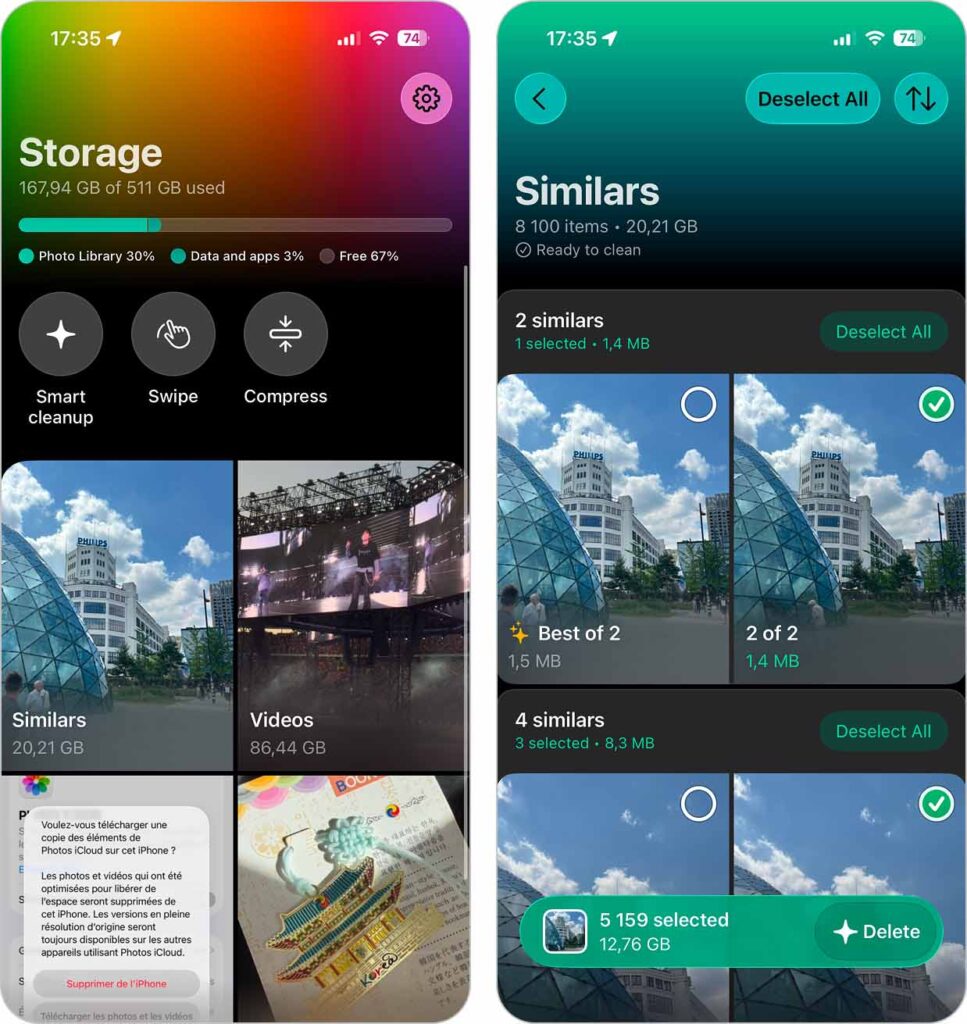
Clever Cleaner: AI CleanUp App impressed us enough to put it at the top of our list. It offers generous daily limits for free use, with no ads and no locked features. Its duplicate/similar photo detection is among the best we’ve tested. On top of that, you get smart storage savers like video compression and Live Photo conversion. Since our previous round of testing, the app has received a major update, with a redesigned interface and more functionality. You can now compress photos as well as videos, sort results by size or date across different tools, and clean up your media with swipes. The app feels fast and responsive, with a layout that’s easy to follow (everything is clearly labeled and color-coded). Most importantly, it always shows exactly what will be removed and how much space you’ll get back.
Clever Cleaner tends to get high marks from reviewers. Since we first featured it in this article, it has even generated a discussion thread reviewing it in our own community forum, and it pops up regularly in YouTube videos, for example:
Download link: App Store page
Notable features:
- Duplicate/similar image detection (advanced AI scanning)
- Large video detection for easier cleanup
- Unnecessary, old, and large screenshot cleanup
- Live Photo compression (converts Live Photos into still images) or deletion
- Photo and video compression with multiple compression levels
- Swipe-based photo and video cleanup (swipe right to keep, left to delete)
- Batch deletion
- Smart Cleanup for removing duplicates and compressing screenshots and Live Photos in one tap
Pros:
- Generous free version with no mandatory subscription
- Completely ad-free
- Unlimited Swipe cleanup
- Wide range of photo and video cleanup tools
- Fast scanning and cleanup, even with large photo libraries
- User-friendly interface with clear cleanup categories
- Local on-device processing for better privacy
- Developed by CleverFiles, the trusted team behind Disk Drill
Cons:
- Focuses exclusively on cleaning up your media library
Personal Experience: Clever Cleaner works exactly as promised. Its AI-powered algorithms are sharp and accurate. When scanning for similar photos, it automatically picks the “Best Shot” to keep, so you don’t have to sort through dozens of nearly identical images. Live Photo “compression” works flawlessly, though we would call it a “converter”—it turns Live Photos into still images by removing the short clips that accompany them; it leaves behind a normal high-quality photo with no loss in resolution.
The Videos tool is another great feature. It lets you quickly pinpoint the videos taking up the most space and either delete them or shrink them down using the Compression tool. You can choose between Optimal, Medium, or Max compression, depending on how aggressive you want to be. Compression isn’t limited to videos anymore, either—you can use it for regular photos and screenshots as well. We also liked that the cleanup tools let you sort files by size or date, which makes it much easier to find the largest or oldest media first.
There’s also a Swipe mode, which a lot of people prefer when they want to review files one by one. You can pick a month and work through your media with swipes, or jump into ready-made groups such as Recents and Favorites, as well as specific media types like screenshots, Live Photos, and videos.
Smart Cleanup takes things a step further when you don’t want to review everything manually. With one tap, it removes duplicate and similar photos while keeping the Best Shot from each group, and compresses screenshots and Live Photos. In our test library, this feature alone cleared about 19 GB of storage. Despite all these additions, we found the free version generous enough for regular cleanup, and Swipe remains unlimited.
App Store User Opinion: Clever Cleaner is one of the highest-rated apps in this category right now. Most people praise how accurately it picks the best photo, how fast cleanup feels, and how much space it frees without forcing you to watch ads or pushing you into a paywall.
The developer has kept its promise to early users. Those who downloaded Clever Cleaner before premium plans were introduced received unlimited lifetime access and can continue using the app without daily limits or a subscription. New users can still use the app for free thanks to generous daily limits, with a subscription available for those who want unrestricted access.
System Requirements: iOS 16.0 or later
Price: Generous free version with daily cleanup limits. Once you reach the daily limit, you can choose one of the available subscription options or wait until the next day to continue cleaning for free.
2. Cleanup: Phone Storage Cleaner
Best for: All-in-one iPhone cleanup
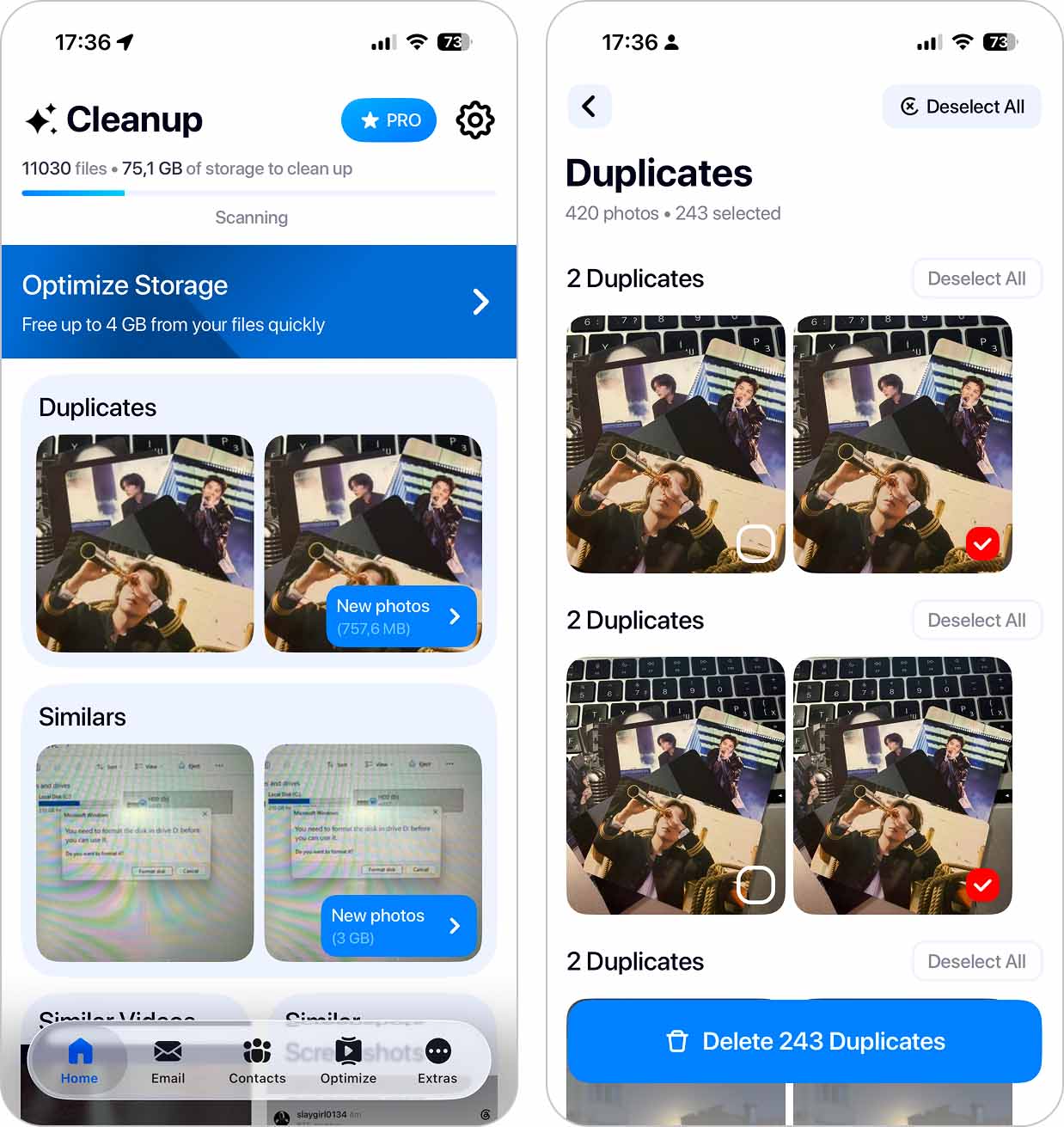
Cleanup: Phone Storage Cleaner is an iPhone app with an impressive almost 707K user ratings on the App Store. Like most cleaners in this category, it focuses mainly on cleaning up the photos and videos in an iPhone’s gallery. The app can easily detect and remove duplicates in the gallery, merge duplicate contacts, and clean your mailbox.
It also comes with a few fun extra features that allow you to create custom widgets for your iPhone and set charging animations that will make your device lock screen stand out.
Download link: App Store page
Notable features:
- Duplicate file detection (photos, videos, contacts)
- Mailbox cleanup
- File sorting
- Contact merge suggestions
- Custom widgets for the Home Screen
- Charging animations for the Lock Screen
- Video compression and Live Photo to still image conversion
- Swipe-based photo cleanup
- Optimize Storage that automatically selects the best items among duplicates, similar photos, screenshots, and videos, and prepares the rest for one-tap deletion
Pros:
- Clean and user-friendly design
- Offers a free trial
- Comes with a few fun additional features
Cons:
- Subscription required for full functionality
- Some features add flair rather than real storage savings
- The price is a bit high when taking into consideration the available features
Personal Experience: In everyday use, Cleanup feels capable and fast. Scans complete quickly, even on large photo libraries, and the app does a good job surfacing obvious clutter right away (duplicates, similar shots, and oversized videos). The video compression tool stood out during testing. It consistently reduced file sizes without visible quality drops, which made it easy to reclaim space without second-guessing the results.
We also liked how much control the app gives you. Nothing gets deleted automatically, previews load fast, and the swipe-based review mode makes sorting feel more deliberate.
App Store User Opinion: Most of the users’ reviews claim that CleanUp is a valuable tool for decluttering their iPhone storage and organizing the gallery. However, some claim that the subscription model is a bit expensive. Also, some users have pointed out that the app needs some improvements in accuracy when scanning for duplicates.
System Requirements: iOS 15.0 or later
Price:
- Free 7-day trial
- Weekly subscription ($11.99)
- Lifetime ($49.99)
3. Boost Cleaner – Clean Up Smart
Best for: Cleaning photos, videos, contacts, and calendar data
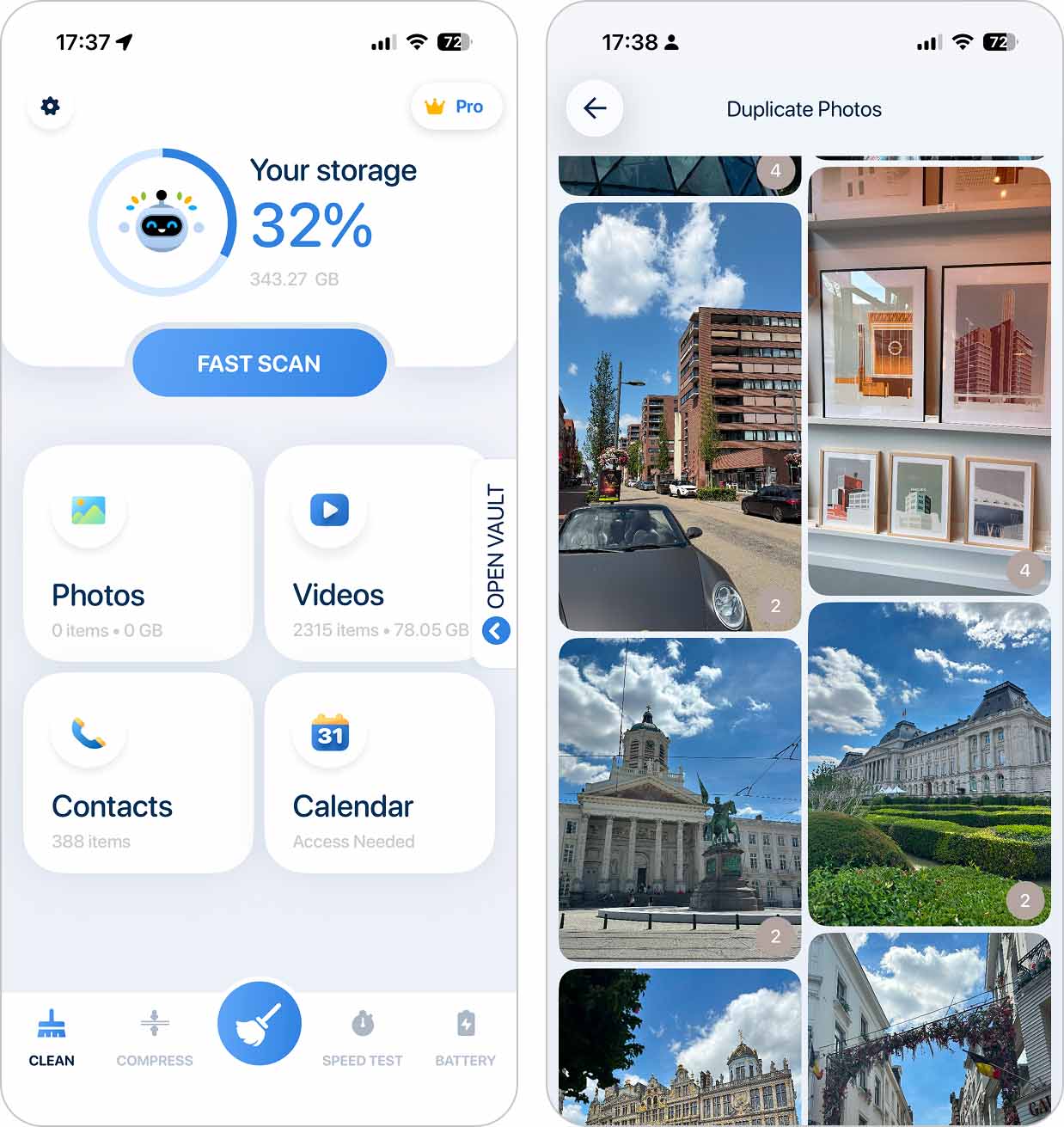
Boost Cleaner – Clean Up Smart comes next on our list. This iPhone storage cleaner keeps things simple. It lets you find and remove similar photos, videos, and screenshots, merge contacts, and even tidy up old or unused calendar entries that tend to get overlooked.
Download link: App Store page
Notable features:
- Similar photo, video, screenshot, and Live Photo detection
- Large video detection and compression
- Duplicate contact merging
- Calendar cleanup
- Storage overview with cleanup suggestions
- Photo and video compression
Pros:
- Free trial that allows to test all features
- General storage cleaning
- Extra useful features not related to storage cleaning
Cons:
- Only a subscription-based payment model
Personal Experience: Boost Cleaner was easy to use, and finding the right tools didn’t take any effort. While duplicate detection wasn’t perfectly accurate and missed some similar items, it made up for that by scanning beyond photos. It also checks videos and screenshots, which helped free up space in areas other cleaners often ignore.
Overall, Boost Cleaner did a good job in clearing out some storage space on the iPhone.
App Store User Opinion: It was difficult to locate many positive user reviews. Many users claim to have experienced technical issues and expressed concerns about subscription management. But in general, the app users are satisfied with the performance.
System Requirements: iOS 15.0 or later
Price:
- Free 3-day trial
- Weekly subscription ($6.99)
- Monthly subscription ($14.99)
- Yearly premium subscription ($49.99)
4. CleanMy®Phone: Cleanup Storage
Best for: Photo library organization
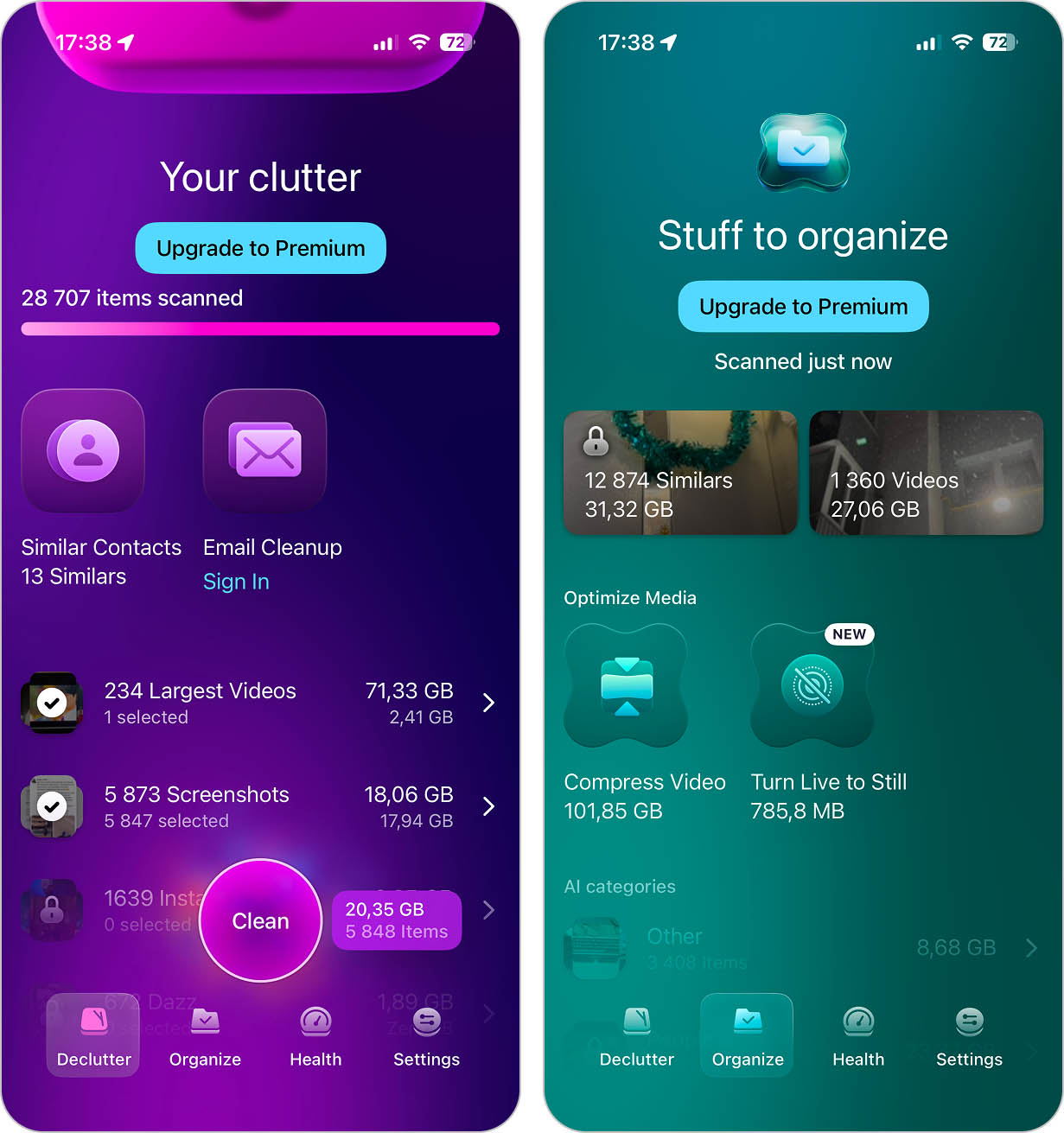
CleanMy®Phone: Cleanup Storage evolved out of Gemini Photos: Gallery Cleaner, a gallery management tool that helped iPhone users organize their photos and videos. Now, it’s a fully-fledged storage cleaning app. This tool will scan the library and remove duplicates, old screenshots, photos of text, blurry pictures, etc. Moreover, the app monitors your new files to make sure that the photos and videos don’t pile up again and cause your iPhone to run out of space.
Download link: App Store page
Notable features:
- Duplicate and similar photo detection
- Clutter cleanup
- Blurry photo and low-quality image detection
- Photo Radar that monitors new photos over time
- Smart gallery organization
- Large video detection
- Similar contact detection and merging
- Mailbox cleanup
- Video compression
- Live Photo to still image conversion
Pros:
- Wide range of cleanup features
- Plenty of AI-powered categories for easier photo organization
- Good value
- No ads
Cons:
- Navigation can take some time to get used to
- Limited free version
Personal Experience: After our testing, we can say without doubt that CleanMy®Phone is a good tool for decluttering photos on your iPhone. It quickly scanned our library with almost 20K photos and removed most of the clutter. More recently, the app has also added tools for merging duplicate contacts and cleaning up your mailbox, although its main focus is still on photos and videos.
One thing we particularly liked is that whether you’re in the Declutter or Organize section, you can view information about individual photos and videos, add them to Favorites, or move them to an album. These changes sync with the Photos app, so you can organize your library without having to switch back and forth between the two apps.
App Store User Opinion: CleanMy®Phone: Storage Cleaner is a highly spoken-of tool for decluttering photos on iPhone. Users find it easy to manage the Library on their phones with this tool and love its efficiency. However, some were disappointed with the one-time purchase cost.
System Requirements: iOS 17.0 or later
Price:
- Free 3-day trial
- Monthly subscription ($9.99)
- Annual subscription ($44.99)
- Lifetime ($99.99)
5. Easy Cleaner.
Best for: Contact cleanup and organization
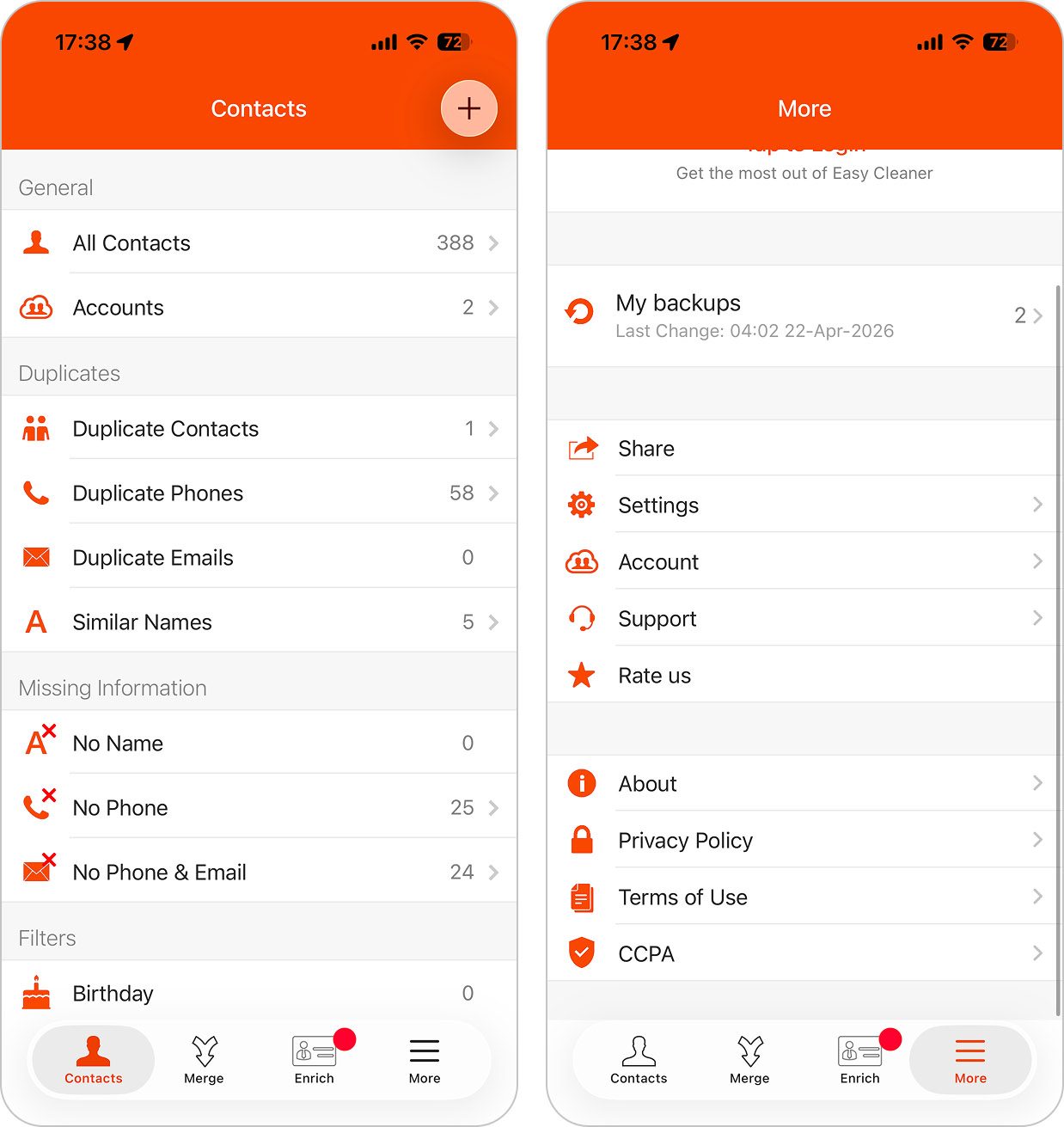
If you’re looking for a free iPhone cleaning application, Easy Cleaner. would be a great choice. This app isn’t designed for cleaning up your photo library, though. It targets your contacts (scanning for duplicates and merging them). It can also detect when your contacts have missing information, such as email addresses, names, and more. Admittedly, you won’t be freeing up lots of space on your iPhone, but you’ll be able to keep your list of contacts tidy and clean.
Download link: App Store page
Notable features:
- Duplicate contact detection
- Contact merge and bulk deletion
- Identification of incomplete contact entries
- Create, edit, and delete contacts directly in the app
Pros:
- Entirely free
- Quick scanning
- Simple design
Cons:
- Cleaning features limited to contacts
Personal Experience: This tool was easy to use and was capable of successfully detecting and removing duplicate contacts. If your main goal is getting your contact list under control, this is the app to use. It’s the best free iPhone cleaner app we’ve tested specifically for contact cleanup, with no distractions and no push to upgrade. Just keep expectations in check – this is all it does, and it does nothing beyond contacts.
App Store User Opinion: The Easy Cleaner app has high ratings due to its straightforwardness and capabilities. Most users are satisfied with the contact duplicate detection and removal results. However, some users have experienced issues with the deleting of the Notes section when merging duplicate contacts.
System Requirements: iOS 15.0 or later
Price: free
6. Slidebox: Photo Cleaner App
Best for: Organizing your photo library with maximum control
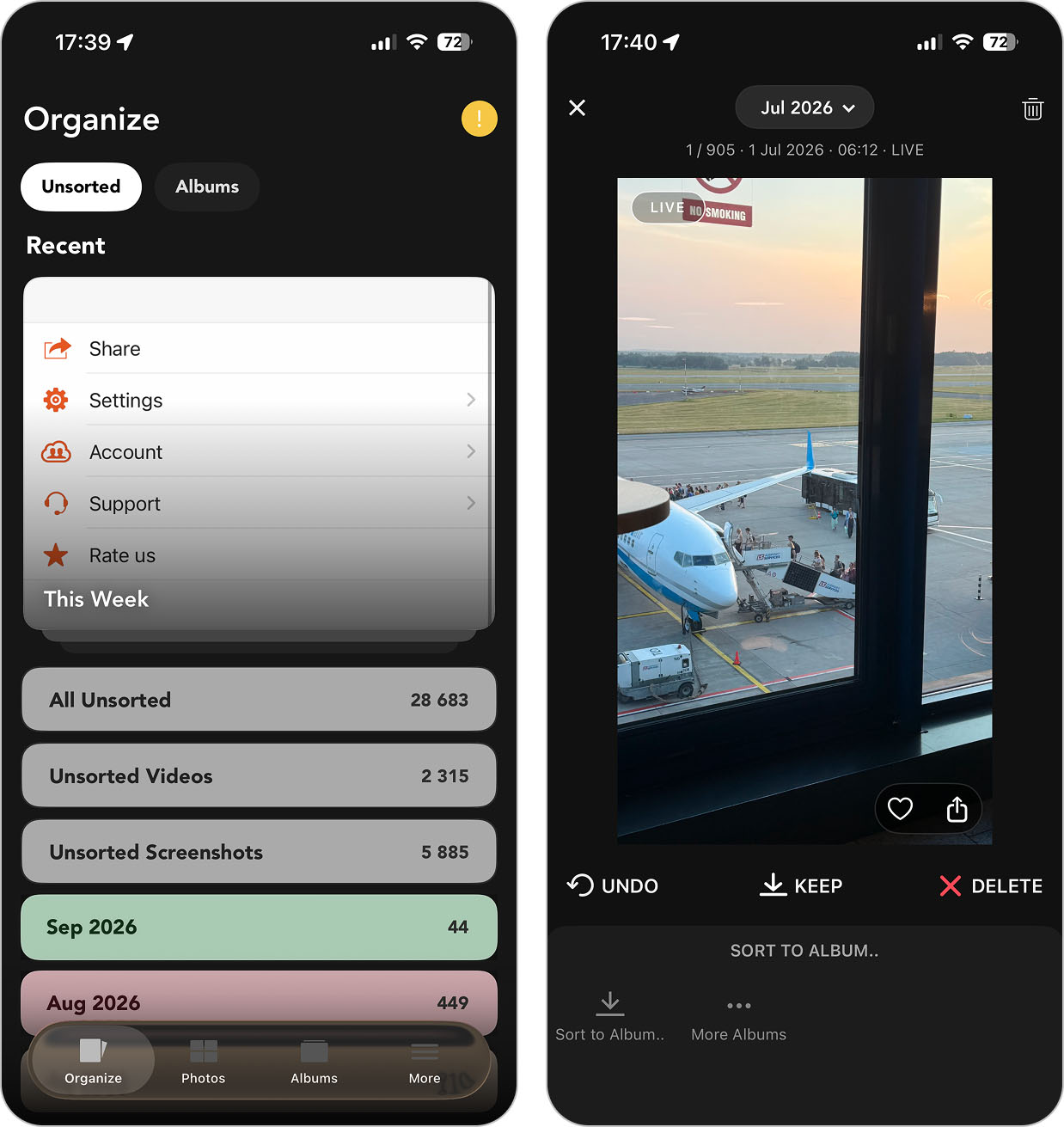
Slidebox is an iPhone photo Cleaner & album organizer application. It can help you sort your photos into different albums and delete the ones you no longer need. However, unlike many previous app on this list, it leans more toward hands-on organization rather than automatic scanning or AI-driven cleanup.
Download link: App Store page
Notable features:
- Manual photo sorting into albums
- Photo deletion
- Undo option for recent actions
- Distraction-free interface
Pros:
- Fast photo loading, even with large libraries
- Good for organizing photos into albums
- Gif support
Cons:
- Limited to photo managing
- Not able to detect duplicate photos
Personal Experience: If you only need to tidy up the Photos app on your iPhone, Slidebox is a good option. We liked how you can easily delete unwanted photos from the application and the organizational capabilities of the tool. Also, it’s nice that you can quickly undo an action if you change your mind about deleting a photo.
App Store User Opinion: Overall, users find Slidebox simple yet brilliant for photo organization on iPhones. They pointed out how easy it was to navigate the tool, and most of the users were happy with the results. Some suggested that to make this app better, it’s a good idea to add a video sorting feature.
System Requirements: iOS 15.0 or later
Price:
- Free 3-day trial Weekly subscription ($1.99) Annual subscription ($22.99) Lifetime ($34.99)
7. AI Cleaner: Clean Up Storage
Best for: AI-powered photo and video cleanup
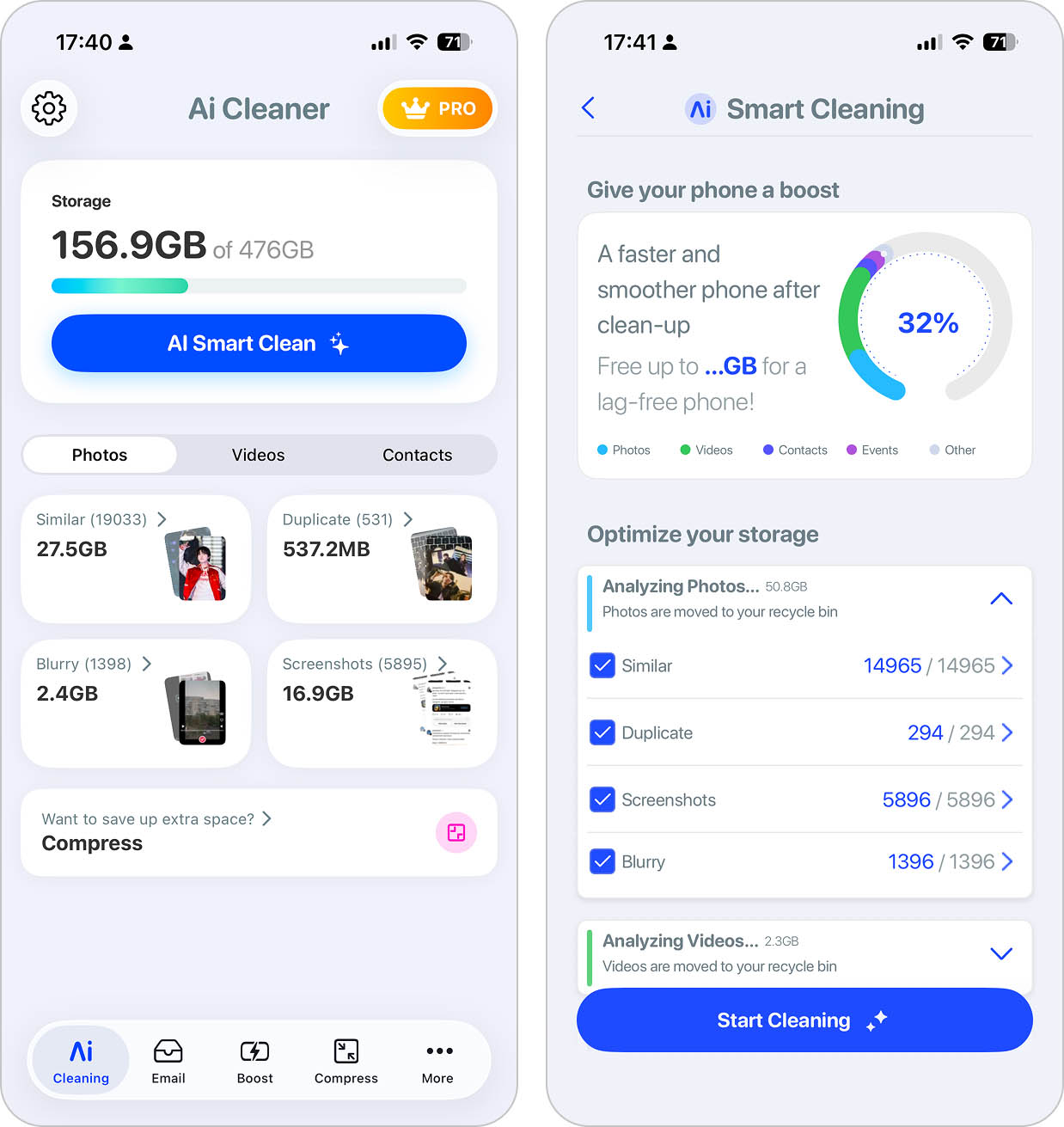
AI Cleaner: Clean Up Storage, like many cleaners, uses AI to identify wasted space such as similar photos and blurry images, and it makes sure you notice that by putting AI right in the name. But duplicate file cleanup isn’t the only thing it does.
Download link: App Store page
Notable features:
- AI duplicate photo and video removal
- Contact cleanup
- Email cleanup
- Calendar event removal
- Secret Space for storing private files
- Photo and video compression
- AI Smart Cleanup for photos, videos, contacts, and calendar events in one tap
Pros:
- AI-powered automation
- Handles duplicates, contacts, events, and large media files
- Simple interface with clear recommendations
Cons:
- Subscription required for full access
- Sometimes flags files users may want to keep
- Some important features are buried and not front and center
Personal Experience: The app is very pleasant to use—it’s quick, no fuss, and delivers results fast. The app’s layout is simple and easy to navigate. Its AI detection could be more accurate though, as it sometimes misidentifies similar photos or contacts that shouldn’t be merged. But considering everything it offers—duplicate removal, contact cleanup, event deletion, and file compression—it’s one of the most feature-packed storage cleaners available. The contact merger worked well in most cases, though we double-checked before approving changes. The photo compression tool was another highlight, it can free up a lot space without noticeable quality loss.
App Store User Opinion: AI Cleaner has received over 170,300 ratings with an average score of 4.6 out of 5 stars. Users appreciate its fast cleanup features, with many highlighting the duplicate photo and contact merging as major time-savers. However, many users found the subscription model expensive, and a few mentioned occasional issues with AI misidentifying files, points we also noticed.
System Requirements: iOS 15.0 or later
Price:
- Free download with limited features
- Monthly subscription ($11.99)
- Annual subscription ($49.99)
8. Cleaner Neat: Clean Up Storage
Best for: Photo and video cleanup with photo enhancement
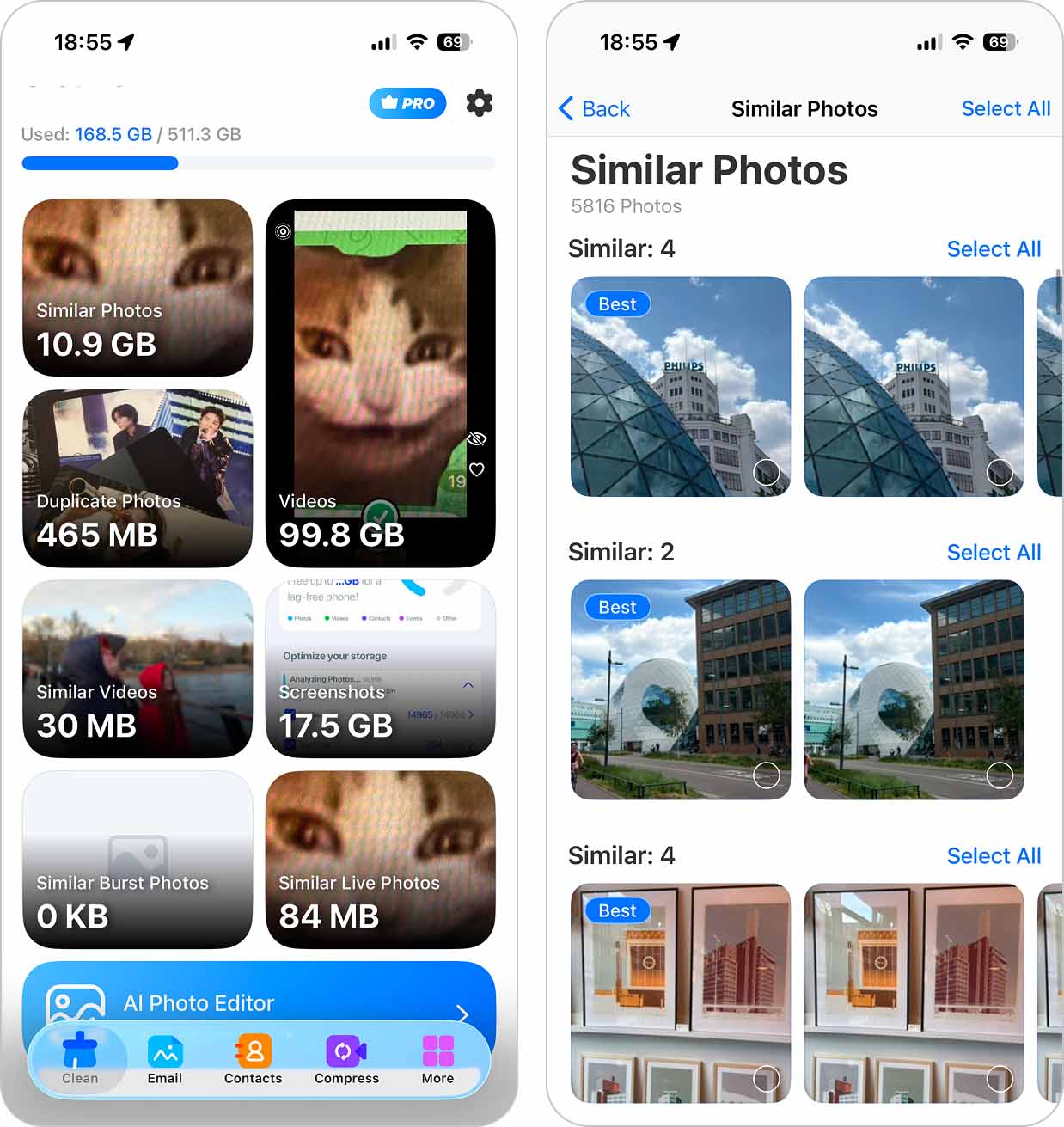
Next on our list is Cleaner Neat: Clean Up Storage. The app gives you access to most of its cleanup tools right from the main screen, with separate options for similar photos, duplicates, similar videos, similar burst photos, and Live Photos. This makes it easy to jump straight into the type of media you want to clean instead of scanning the entire library first. On top of that, it includes a few extra tools that aren’t strictly about storage.
Download link: App Store page
Notable features:
- Duplicate and similar photo detection (including live)
- Similar video detection and cleanup
- Screenshot cleanup
- Video compression
- Duplicate and incomplete contact cleanup
- Contact backup before cleanup
- Private photo gallery for sensitive files
- Home screen photo widgets
- AI photo editor for enhancing photo quality
Pros:
- Offers both storage cleaning features and extra ones
- Has a one-time payment option available
Cons:
- Quite costly
Personal Experience: The tool did a quick job of locating the duplicate photos on the iPhone; though accuracy was hit or miss when it came to “Best Photo” selection (we often disagreed with which image it chose to keep). Exact duplicates weren’t an issue, and video compression worked well. Some extras, like AI photo enhancement, felt tacked on and didn’t add much value in our experience. Maybe not the best iPhone cleaner app on our list, but it’s still a solid option overall.
App Store User Opinion: Most of the users claim that they had no difficulties navigating the Phone cleaner app and were able to easily remove duplicate photos. However, a few had some challenges when dealing with a large photo library.
System Requirements: iOS 15.5 or later
Price:
- Free 3-day trial
- Weekly subscription ($7.99)
- Annual subscription ($49.99)
- Lifetime purchase ($119.99)
9. Cleaner Kit – Clean Up Storage
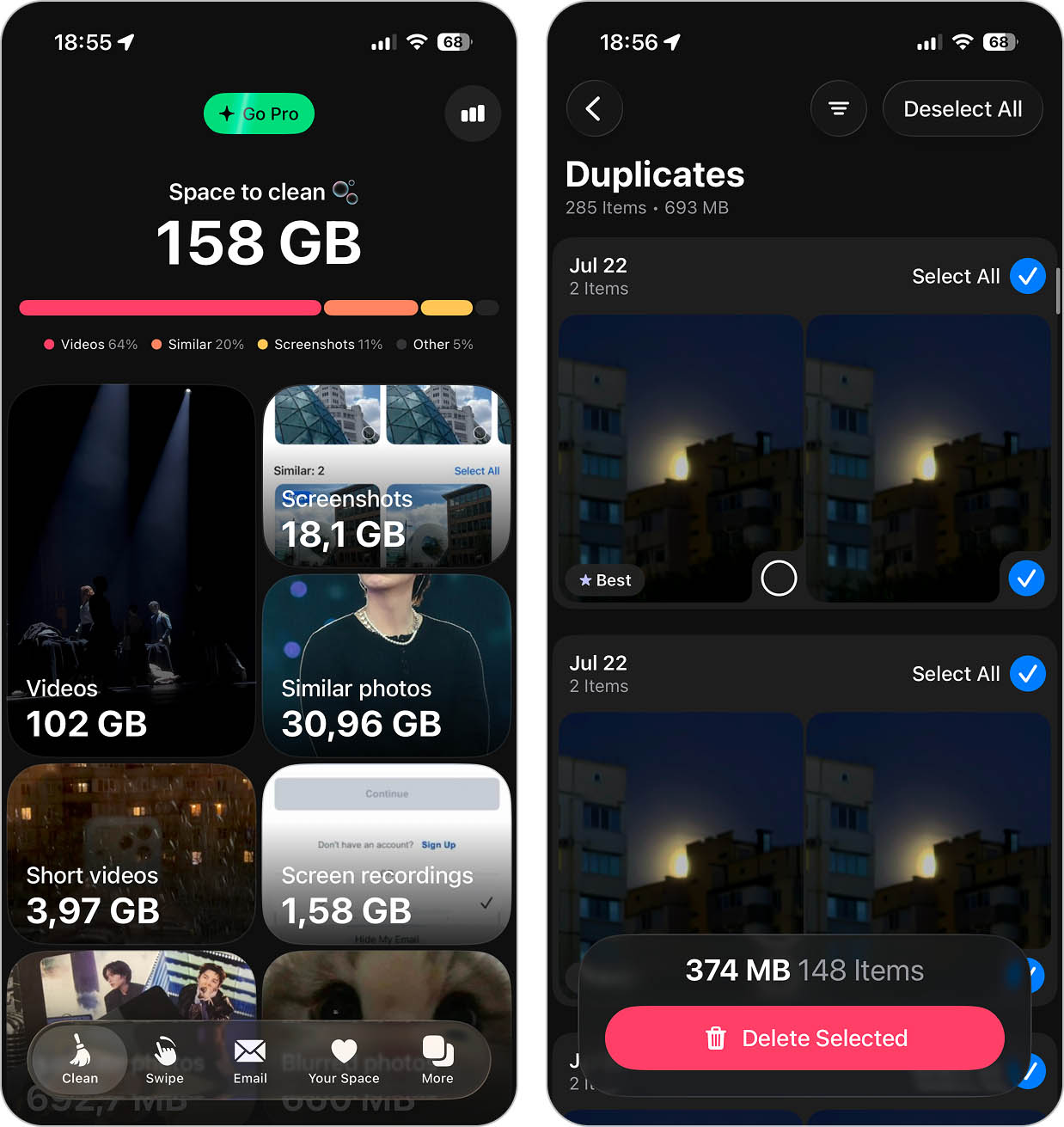
Cleaner Kit is another iPhone storage cleaner application that’s quite popular on the App Store, and it’s easy to see why. True to its name, it feels more like a toolkit than a single-purpose cleaner.
Download link: App Store page
Notable features:
- Duplicate and similar photo and video detection
- Swipe-based photo review
- Automatic cleanup
- Video compression
- Email inbox cleaner with sender-based grouping
- Contact cleanup and duplicate merging
- Calendar cleanup
- Secure storage for sensitive files
- Extra tools like charging animations, widgets
Pros:
- Offers a bundle of features
- Can compress videos
- Provides real-time data about your storage
Cons:
- Is on the higher subscription price point
Personal Experience: In real use, Cleaner Kit is one of the more capable “all-in-one” cleaners we tested. Once the scan finishes, the results are genuinely useful. It grouped photos and videos intelligently, handled similar videos better than most competitors, and the automatic cleanup worked without us having to babysit every step. The Best Photo selection was also more reliable than average.
The main downside we noticed was scan speed (it’s slow, especially on large libraries) but the payoff comes after that wait. When the results finally load, there’s a lot to work with, and the app actually delivers meaningful space savings.
App Store User Opinion: This application has received mixed reviews from users. Some are saying that this tool has been highly effective in cleaning up duplicate files on an iPhone and are happy with its usability and features. At the same time, others claim that the tool hasn’t always given exceptional results in detecting specific types of photos and have experienced some glitches.
System Requirements: iOS 15.0 or later
Price:
- Free 3-day trial
- Weekly subscription ($6.99)
- Annual subscription ($29.99)
10. Simple Cleaner – Clean Storage
Best for: Photo and video library cleanup on older iPhones
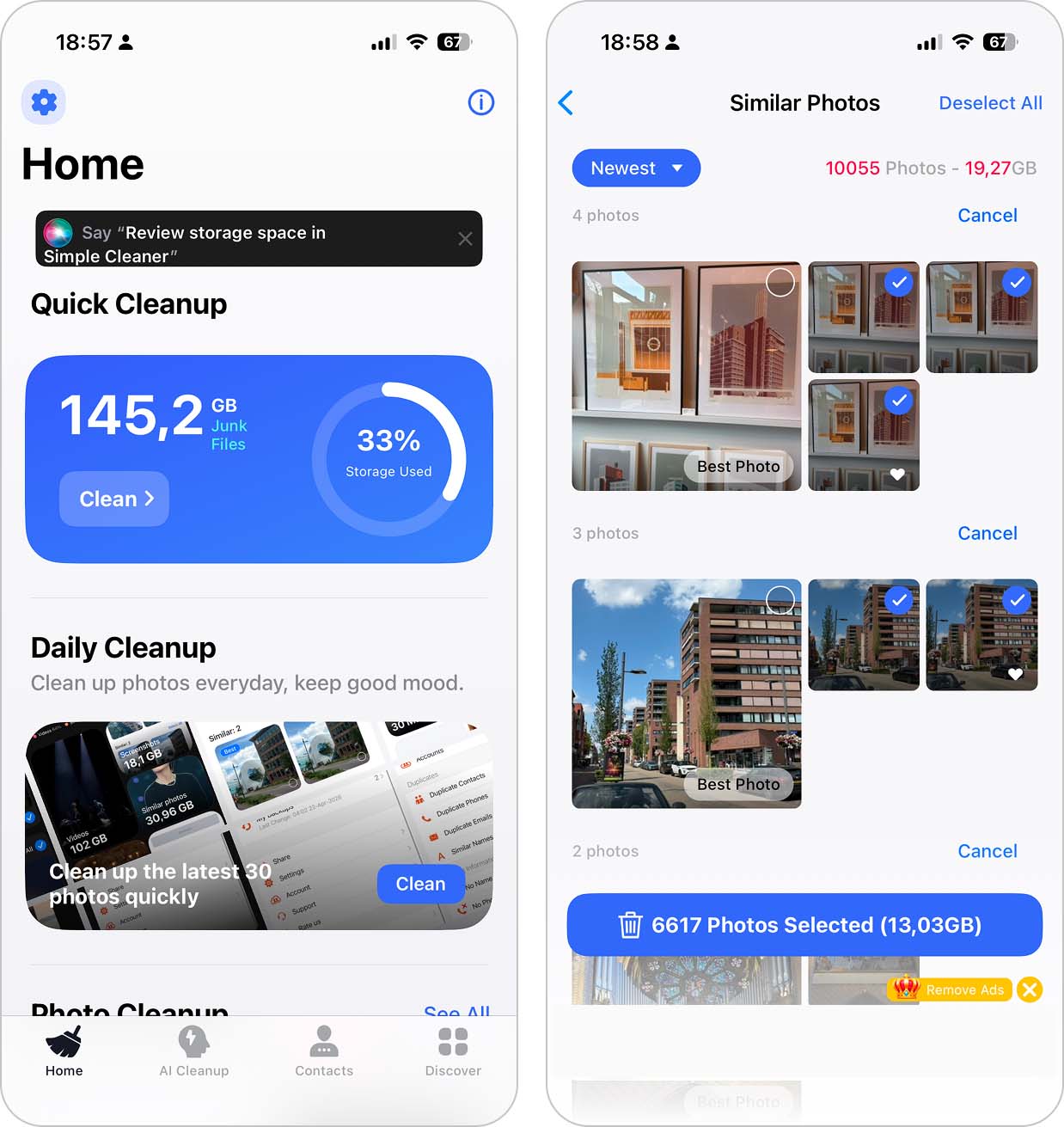
Simple Cleaner is a free cleaning app for iPhone that, despite its name, offers more than just basic cleanup. Though not by much. It’s not a full “kit” app packed with extras, but it covers enough ground to handle what 99% of people actually need.
Download link: App Store page
Notable features:
- Similar photo and video detection
- Photo and video organization by location
- Useless photo and video cleanup
- Manual photo and video sorting options
- Duplicate contact merging
- Secret Space for private photos and videos
Pros:
- Offers both Photo cleaning features and extra ones
- Free version with ads
- Good Library scanning speed
Cons:
- No one-time payment option available
Personal Experience: Simple Cleaner felt straightforward and easy to work with. It scanned the photo library quickly, highlighted duplicates and similar files clearly, and didn’t overwhelm us with extra tools. It lacks deeper features found in larger “kit” apps, but that simplicity works in its favor. That said, if you plan to stick with the free version and never upgrade, be prepared to see a lot of ads. A lot.
App Store User Opinion: Users have mixed feelings about the Simple Cleaner application. Some claim the app to be incredibly useful and are happy with how the app cleaned out unneeded photos and freed up space on their iPhones. However, some have noted that the tool didn’t properly find the duplicates.
System Requirements: iOS 12.0 or later
Price:
- Free version with ads
- Weekly subscription ($3.99)
- Annual subscription ($39.99)
How We Test Each iPhone Storage Cleaner
We tested far more apps than the ten included in this ranking. Each finalist was used for at least a week or for the full trial period on the same iPhone 13 with a large photo library containing thousands of photos, 4K videos, screenshots, screen recordings, duplicates, and blurry shots.
We rated each iPhone storage cleaner based on five criteria:
- 🧩 Feature usefulness. We looked at what the app can actually do, with more weight given to useful cleanup tools such as duplicate and similar photo detection, large video cleanup, and media compression. A long feature list alone didn’t earn extra points.
- 🎯 Accuracy and effectiveness. We checked how well each app identified files for cleanup, whether similar photos were grouped correctly, and whether automatic “Best Photo” selections made sense. We also looked at how clearly the app showed what would be kept and deleted.
- 🧭 Ease of use. We considered how easy it was to find cleanup tools, review results, load previews, and see how much storage could be freed before deleting anything.
- 💸 Value for money. We compared paid features with what you can actually use for free. Apps lost points for overly restrictive free versions, excessive ads, or aggressive upgrade prompts.
- 🛠️ Overall behavior. We tested how each cleaner handled a large library and watched for slow scans, crashes, freezes, visual glitches, and other problems during regular use.
We scored each category from 1 to 5 and averaged the results to get the Our Rating shown in the summary table. The final ranking follows those scores: the higher the average, the higher the app appears on our list.
Verdict
Now let’s wrap it up. Based on our testing, Clever Cleaner is the best iPhone storage cleaner on this list. It covers almost everything we want from a photo and video cleanup app: it finds duplicates and similar photos, handles screenshots and large videos, converts Live Photos into still images, compresses photos and videos, and gives you both automatic and manual cleanup options. Its free version is generous enough for regular use, Swipe is unlimited, and there are no ads. If you want one app to handle most of the clutter in your Photos library, this is the one we’d start with.
Slidebox: Photo Cleaner App is a better choice if you prefer to stay in control of every decision. It doesn’t try to automate the cleanup process as much as the other apps on our list. Instead, it gives you a quick way to review photos, delete what you don’t need, and organize the rest into albums. We’d pick it for manual photo library organization rather than automatic storage cleanup.
For a paid alternative, CleanMy®Phone: Cleanup Storage would be our other pick. Its main strength is still photo and video cleanup, with plenty of AI-powered categories for sorting through a large library, plus tools for video compression and Live Photo conversion. It also goes a little further with contact merging and mailbox cleanup. The free version is more limited than Clever Cleaner’s, but if you don’t mind paying for a cleaner, it’s one of the stronger alternatives we tested.
FAQ
What is the best app to clean my iPhone?
Based on our testing, Clever Cleaner is the best app to clean an iPhone. It combines similar and duplicate photo detection with screenshot cleanup, large video management, photo and video compression, Live Photo conversion, and manual Swipe cleanup. Its generous free version, unlimited Swipe, and lack of ads also give it an advantage over many of the paid cleaners we tested.
Does the iPhone Cleaner app really work?
Yes, iPhone cleaner apps can work well, but within the limits imposed by iOS. They can help you find duplicate and similar photos, large videos, screenshots, and other media you may no longer need. Some can also compress media or clean up contacts, emails, and calendar events. What they can’t do is dig into iOS and remove system files or caches created by other apps.
What is the best free iPhone cleaner app?
Clever Cleaner is our top free option. Its daily free limits are generous enough for regular cleanup, and Swipe can be used without limits. You get access to tools for similar photos, screenshots, videos, Live Photos, and compression without having to start a subscription just to use the app.
What is the safest app to clean my iPhone?
From the apps we tested, Clever Cleaner is our pick if safety is a priority. It processes your media locally on the device and lets you review cleanup results before removing anything. Like other photo cleaners, deleted photos and videos are also moved to the Photos app’s Recently Deleted album first, so they aren’t immediately erased permanently.
What is the best free iPhone storage cleaner app without a subscription?
We’d choose Clever Cleaner. You don’t need a subscription to use its free version, as the app provides daily free cleanup limits. Once you reach a limit, you can wait until the next day and continue cleaning for free instead of subscribing. Swipe cleanup remains unlimited.
Does Apple have a built-in cleaner?
No, Apple doesn’t provide a dedicated iPhone cleaner app. iOS does have several built-in storage management tools, though. You can check recommendations under iPhone Storage, review large apps, remove unwanted photos and videos in Photos, and manage other types of data manually. A third-party cleaner mainly makes this process faster by grouping clutter and giving you additional cleanup and compression tools.
Do iPhones need a cleaning app?
Not necessarily. You can manage your iPhone storage manually with Apple’s built-in tools, and there’s no need to install a cleaner just to keep iOS running properly. A cleaning app becomes more useful when you have a large photo and video library and don’t want to spend hours looking for duplicates, similar shots, screenshots, and large files yourself.
How does a storage space cleaner work?
Basically, a storage space cleaner first runs a scan to detect duplicate files (photos, videos, contacts). Then, it offers you to go through those files to remove the unnecessary ones. Other processes depend on what the chosen storage space cleaner has to offer.
How can I utilize an iOS cleaner to improve my device’s performance?
You can somewhat improve your iPhone’s performance with the help of an iOS cleaner by removing junk files, duplicate photos and videos, managing data, etc. If your storage was nearly full, it can help your iPhone run more smoothly. That said, don’t expect a dramatic performance boost. Cleaners help reduce storage pressure, not turn an old device into a new one.
This article was written by Romana Levko, a Staff Writer at Handy Recovery Advisor. It was recently updated by Princess Lescan.
Curious about our content creation process? Take a look at our Editor Guidelines.