
Today, we’re taking a close look at Clever AI Humanizer – a relatively new tool that aims to humanize AI‑generated text. We first spotted it in our community, where people were actively searching for a solid free AI humanizer. After seeing it mentioned a few times, we figured it was time to check it out ourselves and see how tools like this really perform. We ran full tests, compared it to other tools, and have the numbers to back it all up.
TL;DR Verdict
Clever AI Humanizer is, so far, the best AI to human text converter we’ve laid hands on. In our tests, it delivered the lowest AI detection scores we’ve seen to date (averaging just 4.45% AI across ZeroGPT and GPTZero). That’s a huge drop from the original AI-generated content, which tested between 80%-100%. Grammar also held up well, averaging 92.6/100, with text that read naturally. Easy recommendation, especially for a tool that’s completely free and handles AI content better than many paid alternatives. It even includes its own AI Writer (if you don’t want to copy&paste text back and forth, you can generate fully humanized text from the start, in one place).
Pros:
- 100% free
- Built-in AI writer with automatic humanization
- Low AI detection scores (avg. 4.45%)
- High grammar quality (avg. 92.6/100)
- No sign-up needed for core features
- Multiple writing styles
- Clean, fast interface
- Content history
- Supports many languages
- Works with major detectors
- Keeps original meaning intact
- Fast processing
Cons:
- No browser extension
- No built-in plagiarism checker
- Occasional small grammar quirks
What Is Clever AI Humanizer?
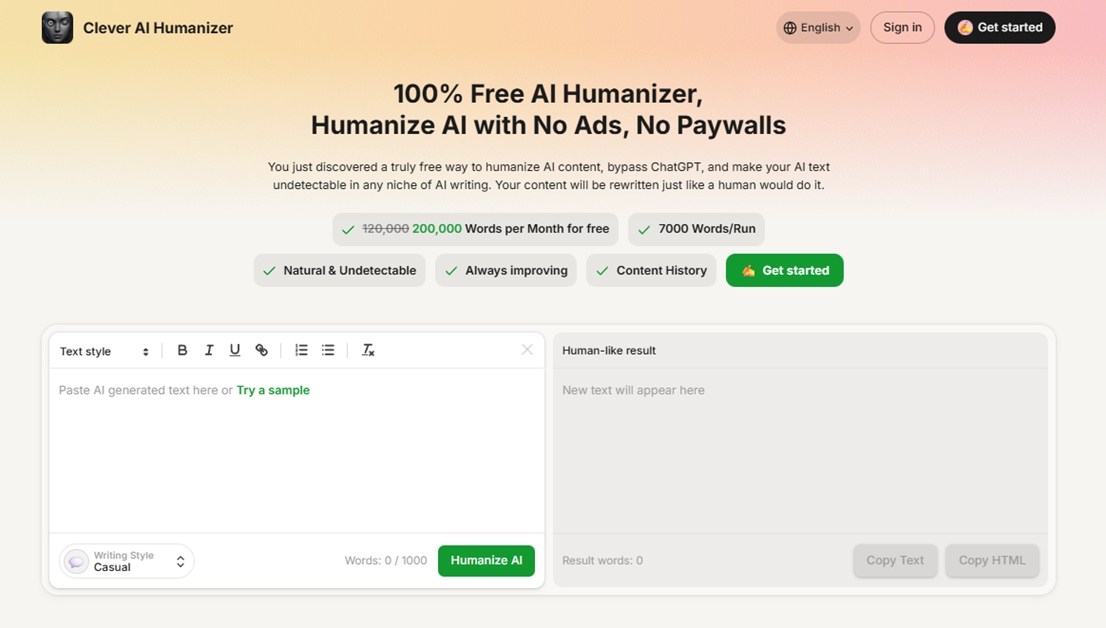
Clever AI Humanizer, as the name gives away, is built by the team behind CleverFiles. Most people know them for Disk Drill, one of the best data recovery tools on the market (and one we know well from hands-on testing). But this is a different space entirely – AI writing. With AI-generated content flooding the internet and more people getting flagged by detectors (sometimes unjustly), it’s no surprise that companies like CleverFiles are jumping into the “humanization” game.
So what does it offer, exactly? On its official page, Clever AI Humanizer puts it like this:
“You just discovered a truly free way to humanize AI content, bypass ChatGPT, and make your AI text undetectable in any niche of AI writing. Your content will be rewritten just like a human would do it.”
Bold statement. And when a tool says it can fix the “AI feel” in your text, avoid detection, and even let you build undetectable AI content right there in its AI text generator (without charging anything), we couldn’t help but get the urge to put it under real testing conditions. (But let’s not rush yet – let’s take a look at what features it offers.)
Key Features
On the surface, Clever AI Humanizer looks like a fairly standard tool of its kind – you get a plain field where you paste your original text, and another simple box where the “humanized” result appears. But there’s more going on under the hood.
Here’s what the key features really are:
- One of the main things it offers is three distinct writing styles (Casual, Formal, and Academic modes). Different flavors you can pick depending on your goal.
- It is also free. Word count is capped at 1,000 words per run (4,000 words total) in the free version. If you need more than that, there’s a free sign-up option that unlocks up to 7,000 words daily.
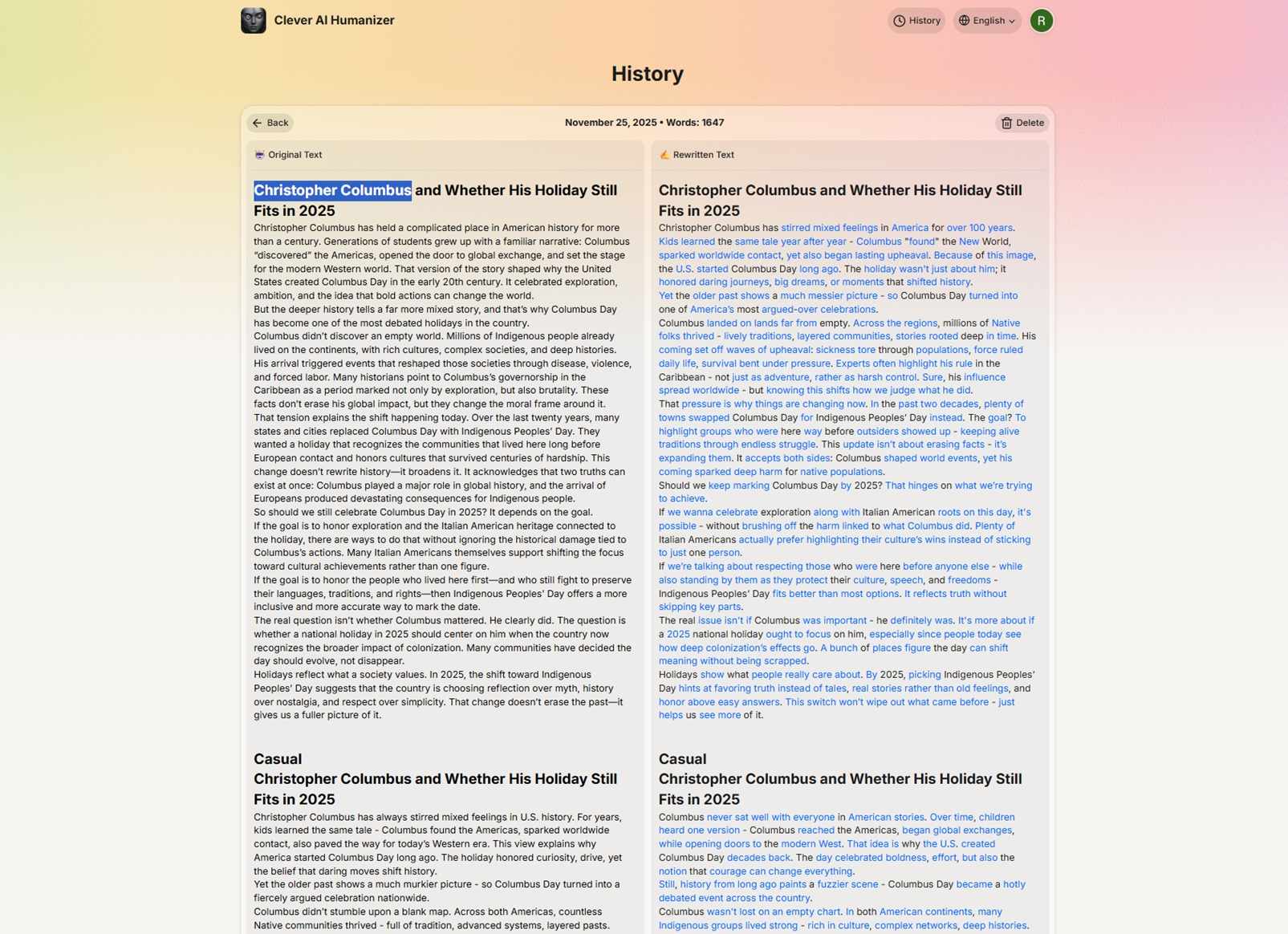
- There’s a built-in history feature: your result is saved (if you’re logged in). You can scroll back, view older runs, and copy any of them again. That’s something a lot of similar tools skip.
- For folks whose first language isn’t English or who write in multiple languages, the tool supports multi-language text. From what we’ve seen, it does work with non-English input, and the UI itself is localized in several languages too.
- One of the newer additions is a built-in AI Writer. You can now write and humanize in the same place. Just pick a format (like Essay, Blog Post, or Article), enter a short prompt, and the tool creates a draft; it immediately runs it through its humanizing engine, so the result is ready-to-use and already optimized to pass AI detection tools.
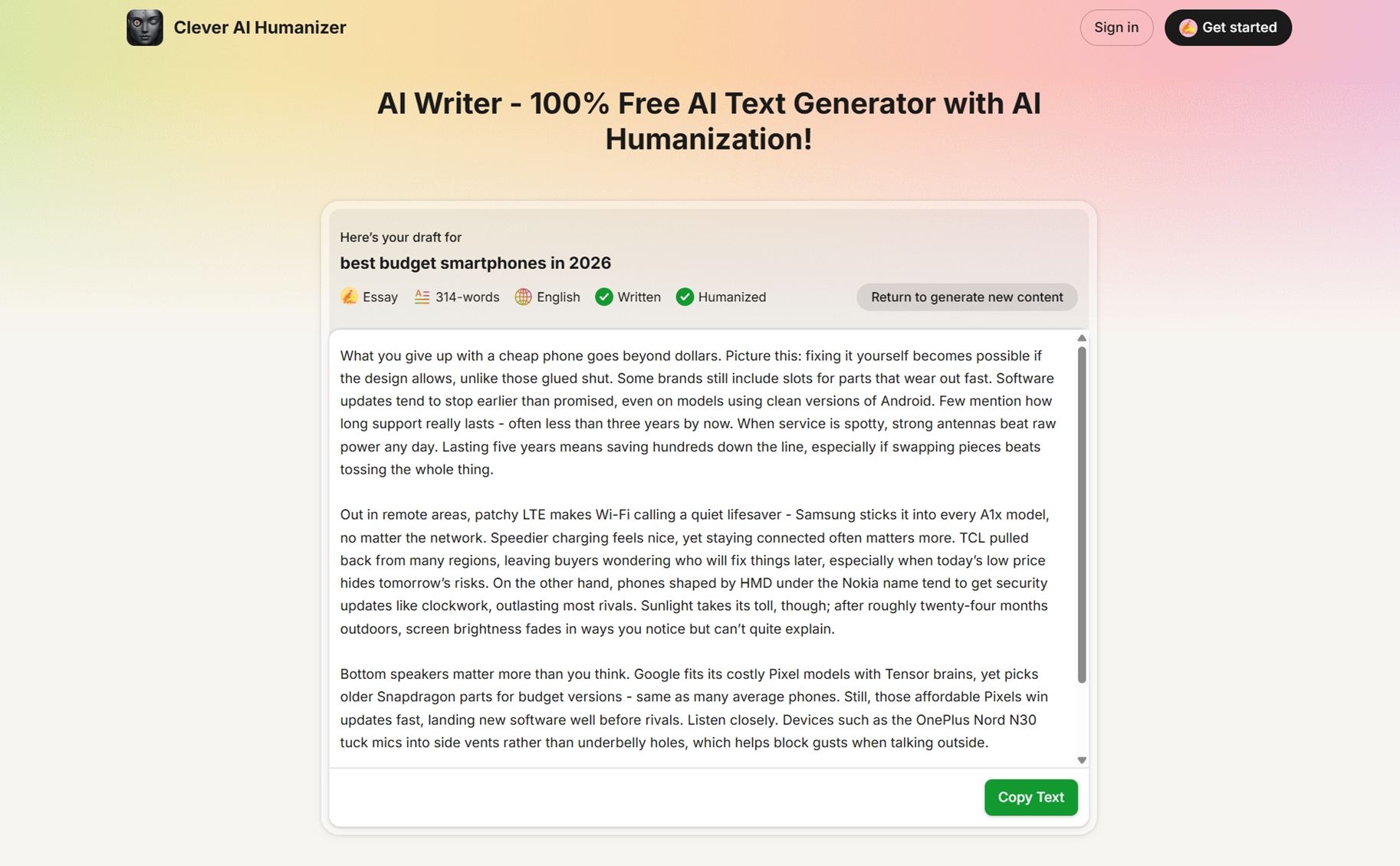 You can choose the writing style (Casual, Formal, or Academic), set the language, and select the desired length (from 100 to 1000 words). Everything happens inside the same interface.
That said, all our tests were done with English content, so keep that in mind if you’re planning to use it heavily in something else.
Overall, Clever AI Humanizer doesn’t try to wow you with complexity. But once you start using it, you notice that the feature set covers almost everything important. And then some – the version history is genuinely useful. We didn’t expect it to matter, but once you start comparing outputs or switching styles, it makes a difference.
UI Overview
As we said, there’s nothing out of the ordinary in its design – most AI humanizer tools follow a similar layout.
This one is very intuitive. You get two side-by-side panels: the left one shows your original AI-generated draft, and the right one displays the rewritten, “humanized” version. Up top, you’ll find basic formatting options like bold, italics, and bullet points, along with buttons to switch tone styles or toggle between different Writing Styles.
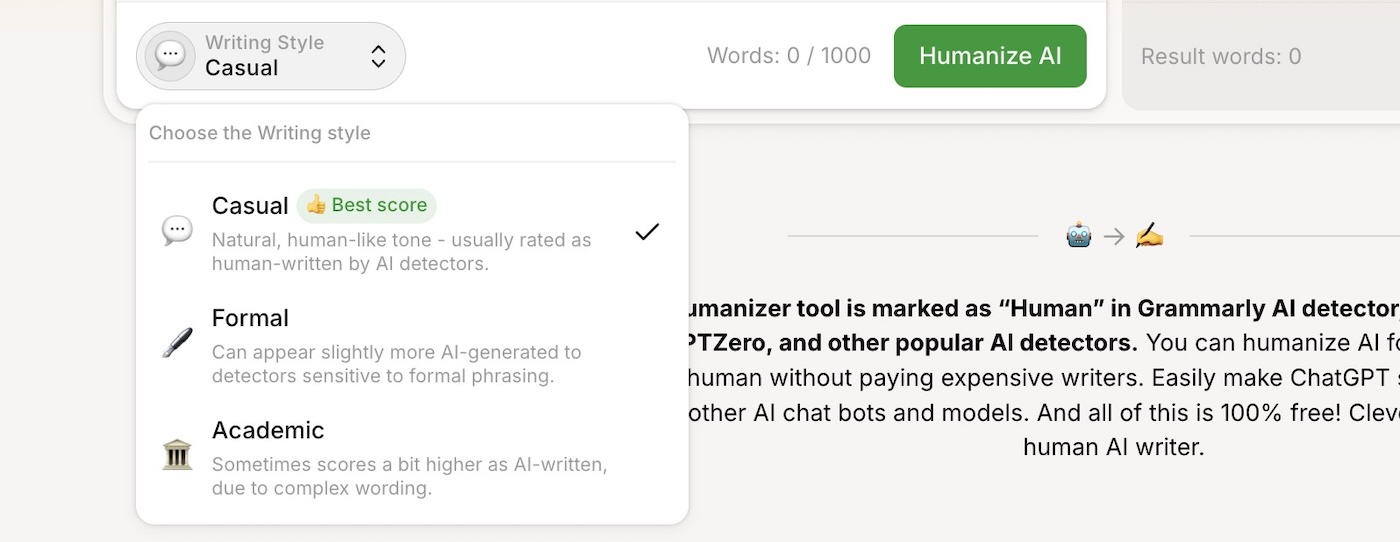
To use it, you just paste your text into the left panel, select your desired tone and style from the toolbar, then hit Humanize All. After a few seconds, the output appears in the right panel. From there, you can either copy text, copy HTML, or keep tweaking.
Simple.
How We Tested Clever AI Humanizer
Here’s how we tested Clever AI Humanizer in a way that, in our opinion, is fair, repeatable, and easy to audit if you want to check for yourself.
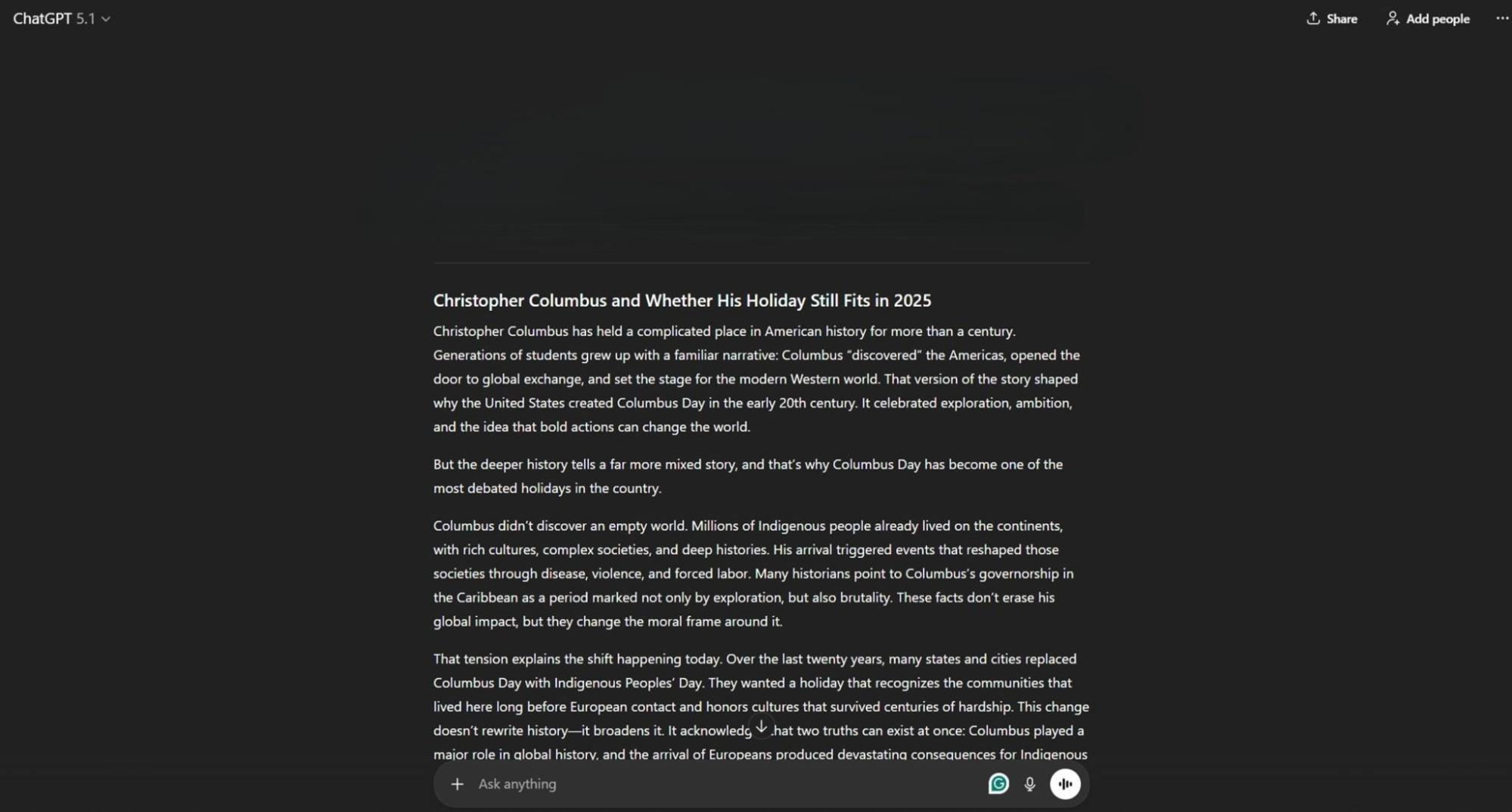
We started with three long AI-generated texts. Each one covered a different topic: a tech piece about AI, a school-assignment-style piece on Christopher Columbus Day, and a short explainer on NFTs. They were written by GPT models (GPT 5.2 and GPT 4o), and each sample was in the 400-650 word range.
You can find our AI-generated text samples here. We chose this range of text lengths because it’s long enough to trigger patterns used by AI detectors and to surface grammar and flow issues that shorter snippets often hide.
To get a better sense of how Clever AI Humanizer performs in practice, alongside it, we also ran the same three texts through three other popular AI humanizers (a mix of paid and free tools that are widely used in this space). That gave us a direct, apples-to-apples comparison across the same inputs, which made it easier to judge Clever AI’s strengths.
We measured performance in two main categories: detection and grammar.
- For detection, we used two separate AI detectors: ZeroGPT and GPTZero. Every humanized text went through both. We chose these two for two reasons. First, they’re among the most widely used detectors today (we checked Similarweb stats, and ZeroGPT topped the list with over 29 million visits, while GPTZero followed with nearly 18 million).
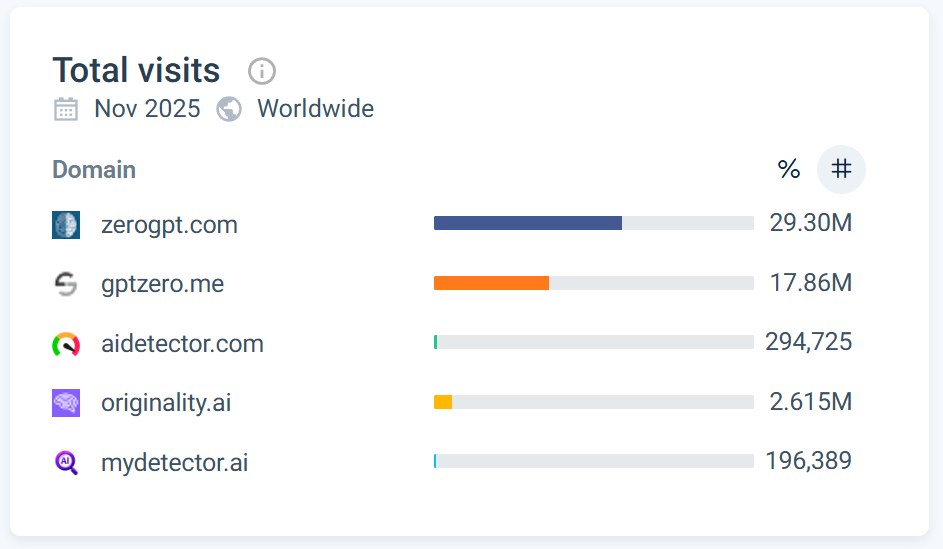 Second, their results are distinct (some detectors produce identical percentages on the same text, while these two showed meaningful differences that made comparisons more useful).
 - Grammar quality followed the same multi-step approach. Each humanized text went through a QuillBot grammar scan to get a 0-100 score. We then averaged those three scores into an “Average Grammar” value for each tool. On top of that we skimmed every sample by eye to catch things automated grammar checks can miss, like awkward phrasing or sudden tone shifts. The manual read did not change the numbers, but it helped us interpret what a 90+ grammar score actually looked like on the page.
To make these numbers useful, we mapped them to a 1-10 scale. Detection rating is based on the “Average Detection” value: we subtract it from 100, divide by ten, and round to the nearest whole number.
Grammar rating works the same way, using “Average Grammar.” An AI text humanizer that averages around 95 on grammar, for example, ends up with a 10/10 grammar score in our tables. A tool sitting near 70 would end up closer to 7/10.
Test Results
Here’s what we got when we put Clever AI Humanizer through that test bench.
Metric |
Results |
Average AI-detection score (3 texts, 2 tools) |
4.45% AI |
ZeroGPT average score (3 texts) |
≈ 4.9% AI |
GPTZero average score (3 texts) |
≈ 4.0% AI |
Average grammar score (QuillBot, 0-100) |
92.6 / 100 |
Detection rating (our 1-10 scale) |
10 / 10 |
Grammar rating (our 1-10 scale) |
9 / 10 |
All three test texts started as clean, fully AI-generated content. In that baseline state, detectors saw them as obviously machine-written (we got detection scores ranging from 80% all the way up to 100%).
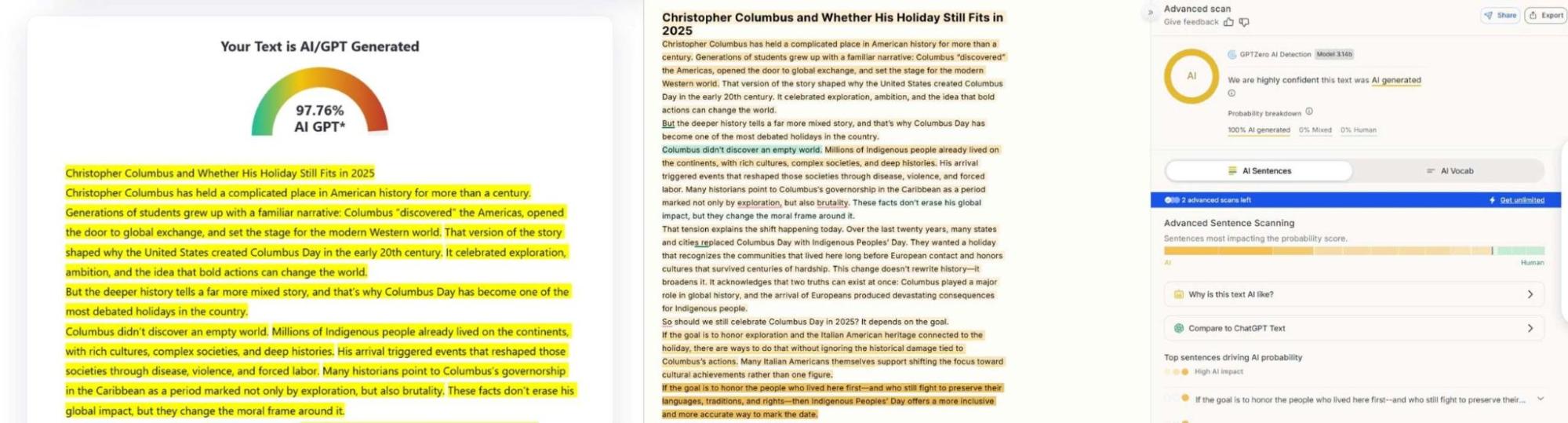
After we ran them through Clever AI Humanizer, the numbers dropped hard.

ZeroGPT and GPTZero both landed in the 0-15% range on every sample, with an overall average of 4.45% AI. For a tool whose job is to help you avoid detection, that is a strong result, especially against a strict ZeroGPT AI content detector.
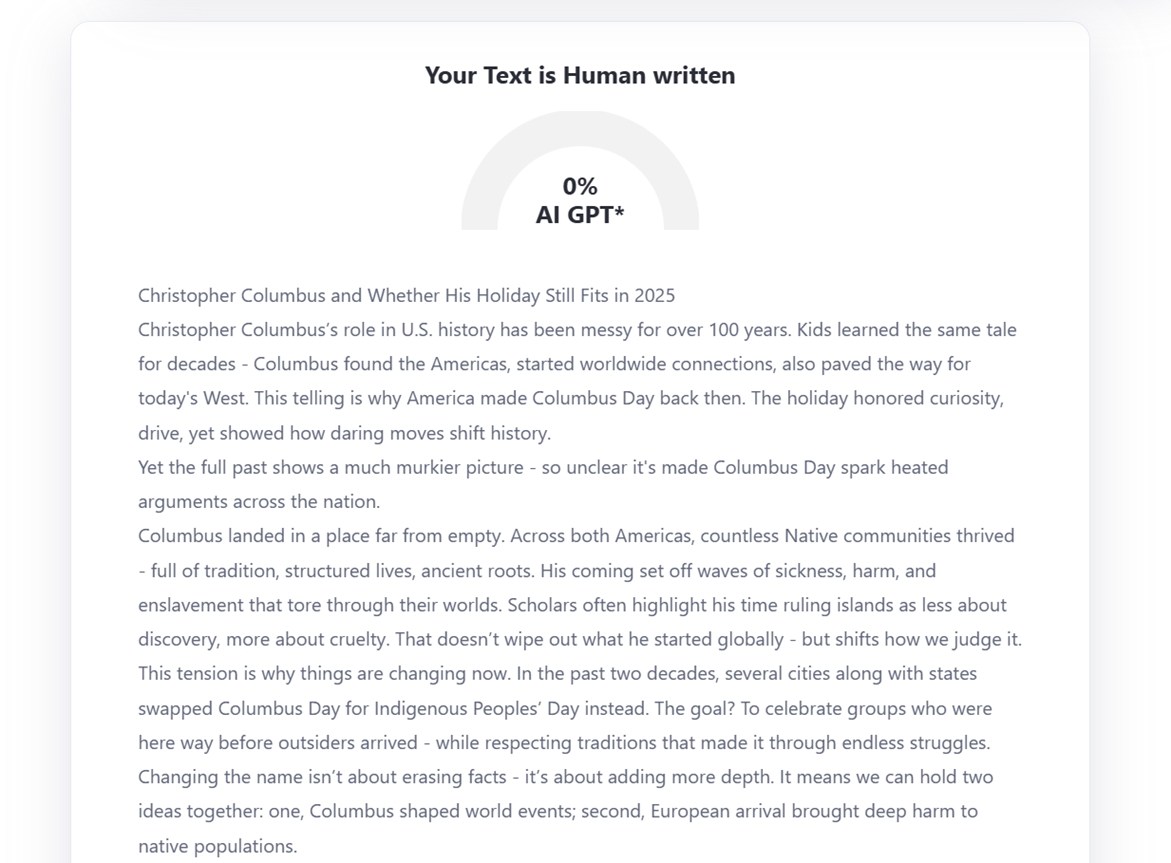
The two detectors behaved very differently in some cases. For example, GPTZero flagged one rewritten sample at 14% AI (86% Human), while ZeroGPT marked the same text as 0% AI with the verdict: “Your Text is Human written”. No surprises here. AI detection isn’t an exact science. Different tools use different scoring models, and some of them seem to generate numbers that vary quite a bit even on identical text. Some feel almost random at times. But to be clear, we’re not here to rate the detectors.
The fact that Clever AI Humanizer consistently brought both detectors under the 15% mark (and often down to 0%) speaks volumes.
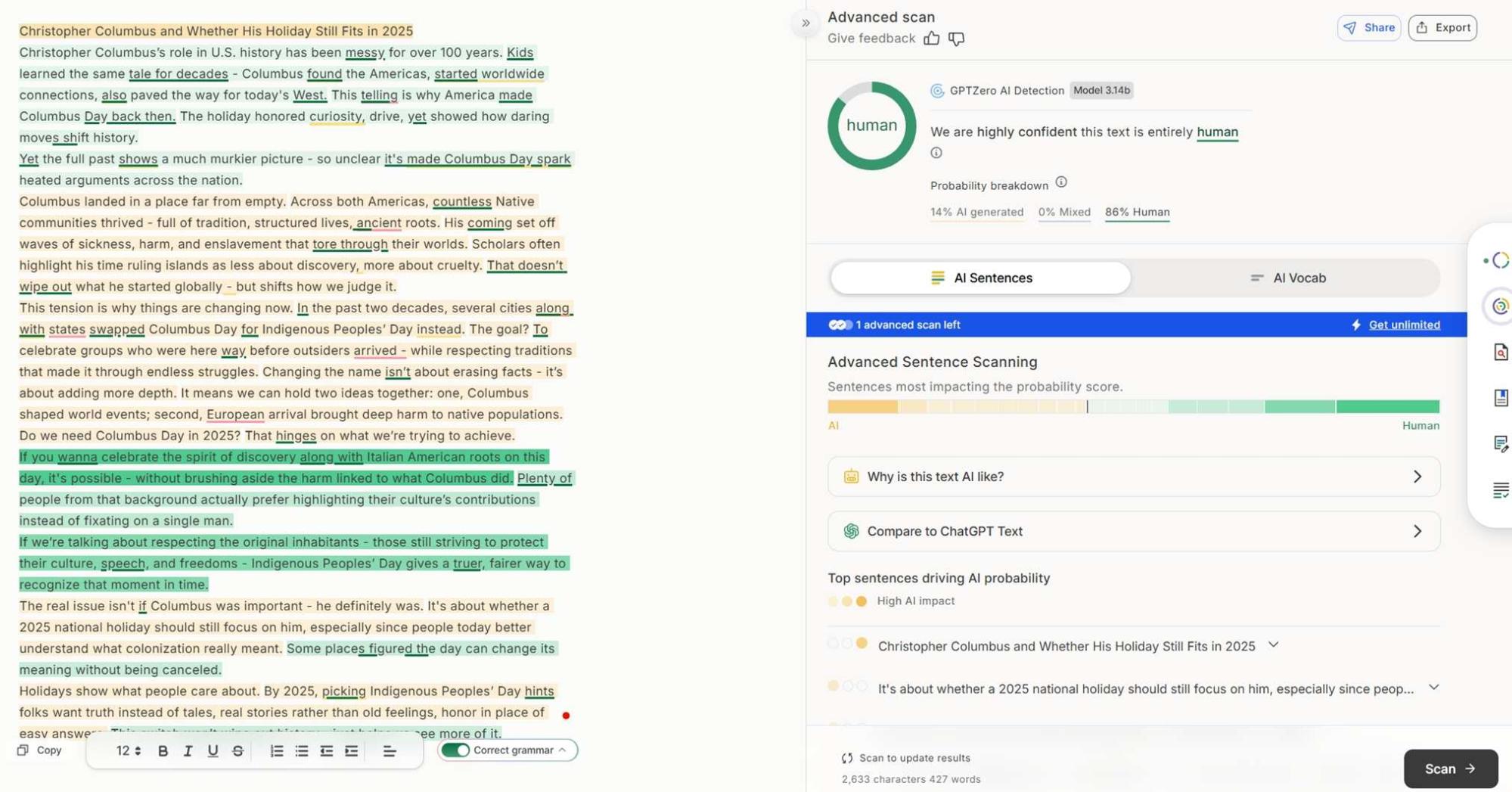
By the way, Casual writing style turned out to be the most effective when it came to avoiding detection. Across all test samples, it consistently produced the lowest AI detection scores (often hitting a clean 0% with zero AI-labeled text). It looks like the developer is aware of this, too – on the site, it’s specifically labeled as the “Best score” option.
Grammar stayed in good shape as well. QuillBot’s scores sat between 90 and 95 on the three samples, which lines up with what we saw when reading them.
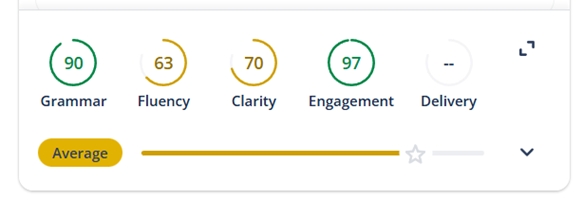
The text felt smooth, without strange word choices or broken syntax. It sometimes leaned a little “too clean”, but nothing that would jump out in a normal blog post or email.
As for the different writing styles, we honestly thought at first it was mostly marketing (something to make the tool feel more customizable and give users a sense of control). But in practice, the chosen writing style actually has a substantial impact on the results. The differences weren’t cosmetic; they changed how detectable the text was in a noticeable way.
As we mentioned, Casual mode gave the lowest AI-detection scores across the board.
- When we switched to Formal, detection scores went up a bit and the text sounded more polished and slightly more “AI-ish.”
- Academic went further in that direction: long sentences, heavier vocabulary, and noticeably higher AI flags from detectors.
So if your goal is to humanize AI text and keep detectors calm, Casual is the mode that makes the most sense.
To be fair, there’s value in Academic or Formal styles too. If you’re working on technical documentation or a formal email, those tones make a lot more sense. Not every piece of writing should feel laid-back or conversational – sometimes structure and professionalism matter more than detection scores.
In practice, the outputs from Clever AI Humanizer looked like something you could paste into a CMS or email client without major edits. We saw varied sentence length, more natural pacing, and fewer repeated structures than the raw GPT drafts. You could still do a final pass for style, but you start from something that feels like a human draft instead of an obvious AI block of text.
Clever AI Humanizer vs Other AI Humanizers
Now let’s see how those results stack up next to a few other AI humanizers we tested alongside Clever AI Humanizer. We chose three tools – Write Human AI, TwainGPT Humanizer, and Monica Humanizer – because they’re frequently mentioned online, and they also all offer paid tiers, which helped us get a clearer sense of the power dynamic between paid tools and the free humanizer we decided to test in this review.
To keep the results meaningful, we used the exact same text samples and ran the same tests on each tool. Every output went through the same detectors and scoring rules.
Tool |
Free / Paid |
Cheapest plan & limits |
Avg AI detection |
Avg grammar |
Clever AI Humanizer |
Free |
Free (200,000 words/month) |
4.45% |
92.6 |
Write Human AI |
Paid |
$12/month (80 requests – 600 words per request) |
14.06% |
93.0 |
TwainGpt Humanizer |
Paid |
$8/month (30,000 words) |
20.38% |
93.3 |
Monica Humanizer |
Free/Paid |
Free (250 words per run); Pro $8.3/month (5000 accesses) |
38.36% |
91.0 |
Percentages show average AI detection across three texts and two detectors. Lower = harder to flag as AI.
Clever AI Humanizer came out with the lowest average AI-detection score in the entire batch. Nothing in our test set dropped the percentages below Clever’s 4.45% average. The paid tools that got close on quality still sat noticeably higher in terms of detection, even when they cleaned the text up well.
Here is how these tools shape the final text:
- Write Human AI and TwainGpt Humanizer both did a nice job on grammar and structure. Their grammar scores slightly edged out Clever’s, but the text often sounded, let’s say, “safe”. The trade-off is that they lean toward a generic tone.
- And Monica Humanizer is what ranked the lowest, far behind Clever ChatGPT humanizer. Both grammar (and especially detection) scores were weaker. On average, it landed around 38% AI in our combined detection tests, which is really high.
If you take into account how it performed in our tests and the fact that this is a completely free tool that outperformed paid alternatives, Clever AI Humanizer makes an even stronger impression. We frankly didn’t expect to see such a big gap.
Where Clever AI Humanizer Sits in the AI Humanizer Market
We wanted a quick reality check on demand, so we measured how often people search for Clever AI Humanizer compared with other humanizer tools.
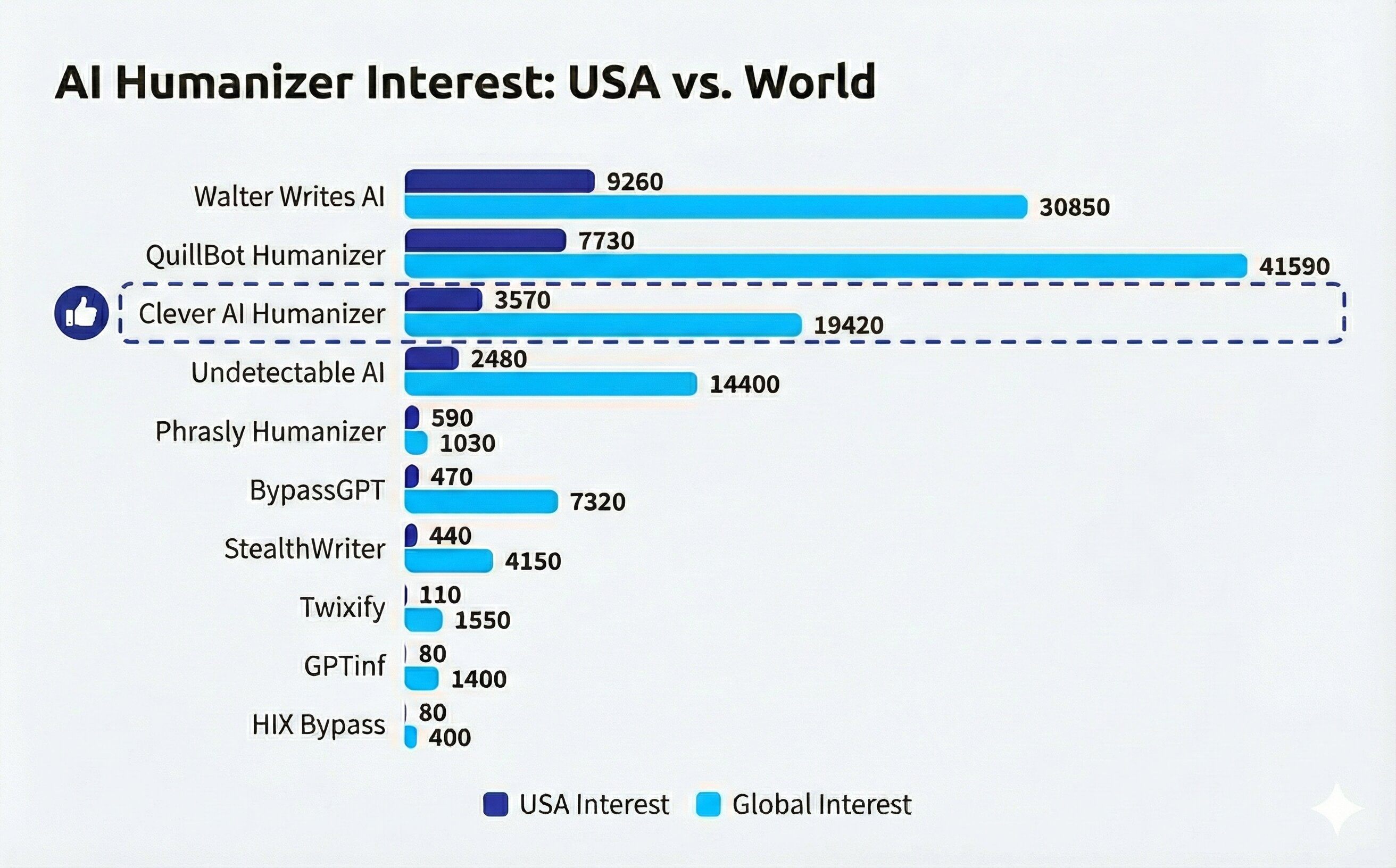
We started this market check from the output, not gut feel: who do people actually search for when they want an AI humanizer. We built a shortlist by reviewing “best AI humanizer” lists across the web, scanning Google AI Overviews, and asking Google Gemini which tools come up most often. Then we pulled branded search volumes in Ahrefs for each name, split into USA and worldwide totals.
We kept the dataset tight. We only counted query versions that explicitly include “humanizer,” since many brands also push AI detection and other features, and that muddies the signal. We also grouped obvious same-product variants and summed them, so one tool didn’t get “extra credit” just because users type it three ways. For example, we rolled “clever ai humanizer,” “clever ai humanizer free,” and “clever humanizer ai” into a single Clever AI Humanizer bucket.
Some brands fought back, honestly. “Humanize AI” sits in that annoying zone where it can mean a specific product, or it can just mean what users want to do, period. Same with “upass”: in queries it doesn’t always point cleanly to AI humanizing, so attribution gets messy fast. And yeah, a few tools look popular in general, but their demand lives under other terms that don’t include “humanizer,” so we mostly left those out on purpose. That’s why we don’t pitch this as research-grade science. It’s a practical snapshot. According to our data, Clever AI Humanizer still lands in a strong position in both the US and global columns, which supports the idea that this review solves a real problem people actively search for.
Final Verdict
So, is Clever AI Humanizer the best AI humanizer out there? Well, if the test numbers are to be believed, then yes.
This 100% free tool vastly outperformed many alternatives we tested, including paid ones that promise professional-grade results. It showed the lowest AI detection scores we’ve ever seen across popular tools like GPTZero and ZeroGPT (dropped full GPT-generated texts down to single-digit detection rates). That’s not easy to do, especially without breaking grammar or tone.
And from a human perspective (not just what the detectors say), the output consistently read more naturally. Even when grammar scores weren’t a perfect 100%, the writing often sounded less like AI than tools that technically scored higher. That’s a big deal if your goal is to blend in with human-written content.
Taking everything into account – the detection results, the writing quality, the feature set, and the fact that it’s completely free – we feel confident giving Clever AI Humanizer a solid 10 out of 10.
FAQ
How do I make my writing sound more human with Clever AI Humanizer?
In our tests, the Casual writing style consistently gave the most natural results (both to the human eye and to AI detectors). It reduced repetitive structure, varied sentence length, and introduced small things that actually made the text feel more believable. If your goal is to humanize AI text in a way that sounds natural and avoids detection, Casual is the mode we recommend starting with.
The others (like Academic or Technical) can be useful too, but they tend to bring back more of that “AI feel” detectors pick up on.
How does this AI humanizer work exactly?
The developers actually published a full breakdown of how their system works (you can read it here). But here’s the short version:
It fully rewrites AI-generated text at the structural level, not just swapping out words. It uses a large language model to break common LLM patterns like repetitive syntax, uniform sentence lengths, and overused grammar.
The model adjusts for entropy and burstiness (two traits AI detectors focus on). It increases randomness: some sentences get shortened, others expanded, punctuation shifts, and the flow becomes less “predictable”. These changes make the text harder to flag using AI detector tools, which rely on detecting typical AI structure.
What AI detectors can Clever AI Humanizer bypass?
Its official site lists several of the most widely used detectors – ZeroGPT, GPTZero, QuillBot’s AI Checker, Undetectable.ai. But you can use it with any AI detector. The tool isn’t tied to a specific one, and in our testing, it consistently lowered AI scores across multiple platforms.
That said, AI detection is far from perfect. These tools often disagree with each other, and there’s growing concern around false positives. There have been real incidents, including news stories where AI detectors falsely accused students of cheating.
This entire space is still in flux. Detection tools change frequently, and many operate on black-box logic that even developers don’t fully explain. So while Clever AI Humanizer has shown strong performance against today’s detectors, there’s no such thing as a guaranteed bypass.
This article was written by Roman Demian, a Content Editor and QA Specialist at Handy Recovery Advisor.
Curious about our content creation process? Take a look at our Editor Guidelines.